


Connector for HCL Commerce Manual / Version 2101
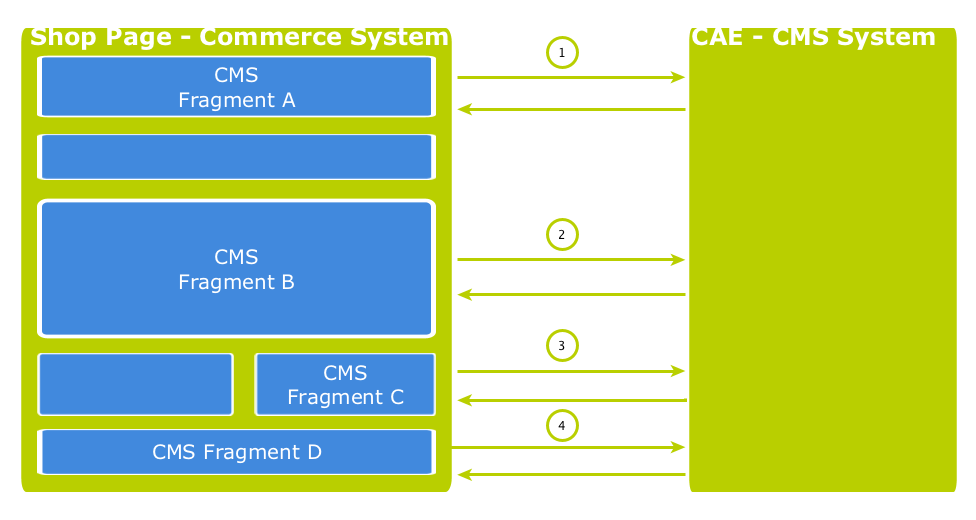
Table Of ContentsA shop page in the commerce-led scenario can contain multiple CMS fragments (placements and views). Normally, each CMS fragment would cause an external HTTP call to the CAE which can lead to performance loss and, depending on the commerce system, reach a limit of outgoing requests on the commerce side (see Figure 8.9, “Multiple Fragment Requests without Prefetching”). Furthermore, each request is processed consecutively. As a result, the response times for each individual CAE request add up to the total pageview time. Therefore, CAE offers a mechanism to lower the amount of CAE requests by prefetching all expected fragments in advance in a single call.
How to configure which fragments to prefetch
If the "prefetching feature" is enabled in the CoreMedia Fragment Connector on the commerce side, a
dedicated prefetchFragments call is made to the CAE. The result is a JSON
structure that consists of all fragments that are pre-rendered by the CAE. To predict the
fragment calls that would normally follow, the CAE follows a twofold strategy.
Each CMS fragment call of a single shop page should conceptually go to the "same" CMS page. Which means technically, that all the parameters that identify a CMS page should be the same in all CMS fragment calls of a single shop page (these are:
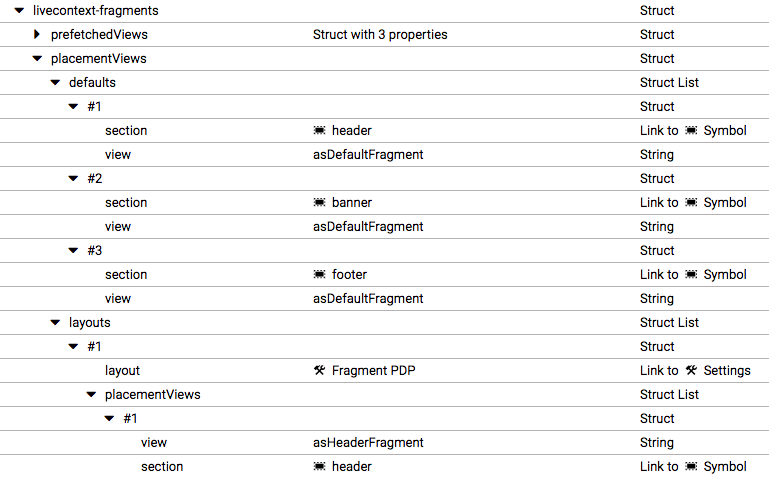
externalRef,productId,categoryIdandpageId). The CAE therefore uses these parameters to predict the required fragments. Every placement in the assigned page layout can be considered as "potentially to be requested". Therefore, every placement is contained as a separate fragment in the JSON result. To identify the view that should be used to render the placement a configuration is read from theLiveContextSettingscontent. The Figure 8.10, “LiveContext Settings: Prefetch Views per Placement” shows an example configuration. If no setting can be found, it is assumed that the default view should be rendered for a placement.Additionally, every shop page requests a few more, mostly technical fragments from the CAE. These fragments are requested as different "views" of the same page. Examples of such views are
metadata,externalHeadandexternalFooterthat are likely to be included on every shop page. These "additional views" are also read from theLiveContextSettingscontent and they are also included in the JSON result. The Figure 8.11, “LiveContext Settings: Prefetching Additional Views” shows an example of such a configuration.
If all required fragments are already included in the prefetch result, then only one CAE
fragment request is needed per shop page. All subsequent fragment calls are then served from the
local fragment cache within the CoreMedia Fragment Connector. Thus, the configuration should be
complete for each shop page type. The configuration is placed in the
LiveContext Settings content, to be found in the
Options/Settings folder of the corresponding site and linked in the root
channel. In the following sections the configuration is explained in detail.
Prefetch Configuration: View per Placement
The first configuration option is to define a view name for a certain placement. You can add
this view name to the prefetch result, otherwise the default view would be rendered for this
placement. Within the livecontext-fragments struct the
placementViews sub-struct is used to store this information.

Note
The configuration needs only to be done, if there are placements that should be rendered with a different view than the default view.
Below the placementViews struct, two sub-elements are used:
defaultsDefines the view, a placement will be prefetched with, for all layouts. It overrides the default view and is itself overwritten by a layout specific configuration in the
layoutsstruct element.layoutsDefines a layout-specific view with which a placement will be prefetched. It overrides the view defined in the
defaultsstruct element for this specific placement.
Prefetch Configuration: Additional Views
The second configuration option is the definition of additional views which should also be
included into the prefetch result. Within the livecontext-fragments
struct the prefetchedViews sub-struct is used for these settings.
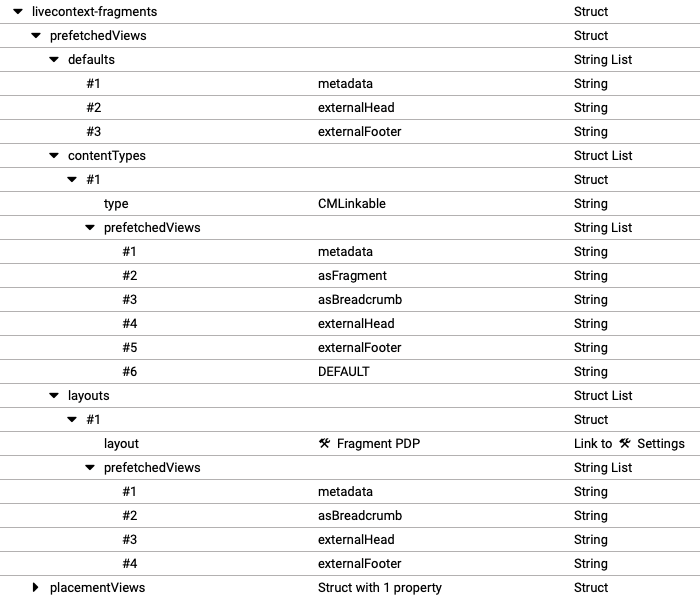
Below the prefetchedViews struct three sub-elements are used:
defaultsDefines the views that should be additionally prefetched for all layouts. It is overwritten by a layout specific configuration in the
layoutselement.layoutsDefines the views that should be additionally prefetched for a specific layout. It overwrites the configuration in the
defaultsstruct element.contentTypesDefines the views that should be prefetched for a specific content type on Content Pages (see Section 8.2, “Adding CMS Fragments to Shop Pages” for a definition of Content Page) (for example, a page that has a CMS article as main content).
Content Pages can contain CMS content of different types. For each type you can configure a struct with views that will be prefetched. You can use abstract or parent content types to combine multiple types (
CMLinkable, for instance).If more than one configured content type can be applied to a given content, the configuration for the most specific content type will prevail. For example when
CMLinkableandCMChannelare configured, then for aCMChanneldocument only the configuration forCMChannelwill be taken into account.
To define the default view to be additionally prefetched, use the
DEFAULT identifier.
Configuration in HCL Commerce
The prefetch functionality is enabled by default. It can be enabled or disabled via property
com.coremedia.fragmentConnector.isPrefetchEnabled in
coremedia-connector.properties.
