


Operations Basics / Version 2512.0
Table Of ContentsThe CoreMedia system supports gRPC and CORBA for internal communication. While servers always offer both protocols for clients to connect, clients can be configured to use either gRPC or CORBA. The protocol can be chosen freely on each start of a component. Currently, CORBA is the default protocol.
Note that Content Servers and the Workflow Server also contain client parts for internal communication, e.g., for publication, replication, etc. Choosing a protocol on a server therefore does make a difference although services offered by the servers to their clients always cover both protocols.
For communicating via CORBA, CoreMedia applications require the IOR of the Content Server and Workflow Server which they want to communicate with. The IOR of a server is delivered via the HTTP protocol. The following diagram illustrates retrieval of the CORBA IOR from a server.
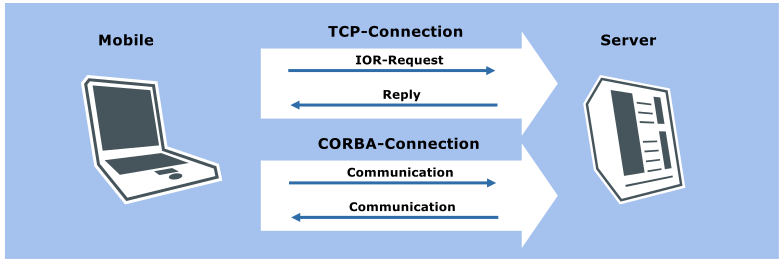
For communicating via gRPC, CoreMedia applications require the gRPC endpoint and the HTTP base URI of the
Content Server and the gRPC endpoint of the Workflow Server which
they want to communicate with. In addition to that, environment variable REPOSITORY_USEGRPC=true
must be set.

Note
With release 2512.0 of the CoreMedia system, the Workflow Server does not yet offer gRPC services to its clients. Activating gRPC on clients (e.g., Studio Server or command line tools) won't do any harm as long as these are of release 2512.0, too. Future clients, though, will fail to connect to this Workflow Server if gRPC is active on them. With releases 2512.1, 2606.0 and newer, the Workflow Server supports gRPC to the full extent.
Due to the current lack of gRPC services in the Workflow Server, the IOR URL of the Content Management Server must always be specified when a client wants to connect to the Workflow Server.
The Content Management Server/Live
Server embed their own host names into the IOR, which must be resolved by the client machines. If this
is not possible by the client, you can configure the server to embed a numeric IP address into the IOR. To do so,
set the property com.coremedia.corba.server.host. In the following example, the ORB is configured to
embed its numeric address, by setting a system property:
-Dcom.coremedia.corba.server.host="10.1.3.253"
The Unified API takes care of detecting and cleaning up stale TCP connections
at the CORBA level. This aids in reconnecting to the servers after a communication failure or a server
downtime. If reconnects happen spuriously without an obvious cause, this feature can be disabled
by setting the system property com.coremedia.corba.orb.reconnect=false.
