


Operations Basics / Version 2512.0
Table Of ContentsIn order to communicate with the CoreMedia Server or Workflow Server, two or three open ports are required:
The HTTP port to provide non-CORBA/gRPC services (Blob up/download, etc), and serve the CORBA IOR
The CORBA port for communication (only if CORBA is to be used; with release 2512.0 mandatory on Workflow Server and Content Management Server)
The gRPC port for communication (only if gRPC is to be used)
In the default configuration, the CORBA port changes with every restart of the application server, which is
inconvenient in case of an intermediate firewall. In this case, the port can be set to a fixed value through the
property com.coremedia.corba.server.port. In the following example, the ORB is configured to listen
on port 55555, by setting a system property:
-Dcom.coremedia.corba.server.port=55555
If you want to access the Server from "outside" a firewall and the server IP address is not directly accessible (due to network address translation for example), it is possible to establish an SSH tunnel. The tunnel forwards all traffic from the client to the server. Of course, the endpoint of the tunnel must be able to reach the server. Figure 4.2, “Schema of the SSH tunnel” shows the scenario:
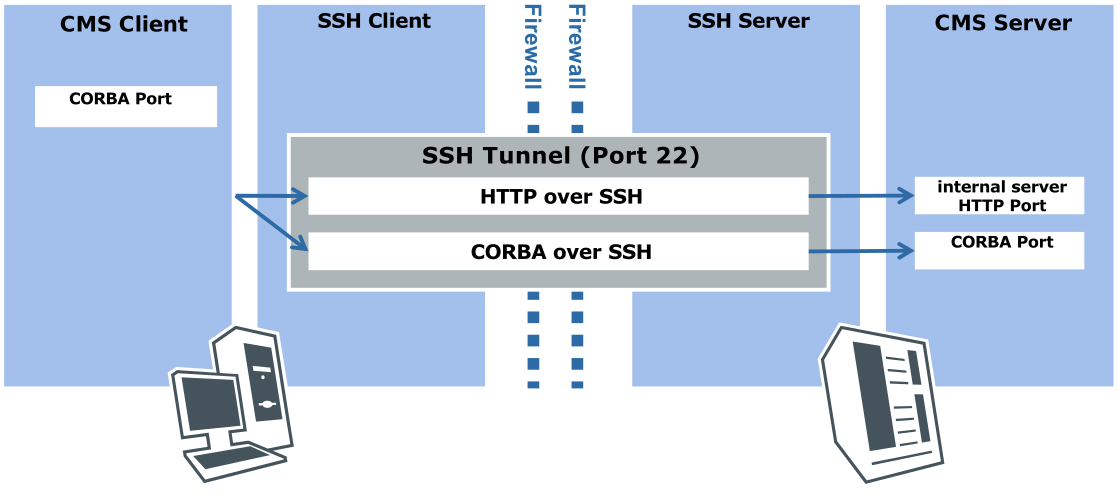
Four parties are involved in the tunneling:
A client <CMSClient> which cannot access the server directly.
The client-side SSH client <SSHClient> which cannot access the Content Server.
The server-side SSH server <SSHServer> which can access the Content Server.
The CoreMedia Server <CMSServer>.
<CMSClient>/<SSHClient> and <CMSServer>/<SSHServer> can reside on the same machine respectively.
At least two ports must be configured:
<HTTPPort> is the HTTP port for non-CORBA/gRPC services (Blob up/download, etc) and the IOR. This one is mandatory.
<CORBAPort> is the port for CORBA communication. This one is only required if CORBA communication is to be allowed. With release 2512.0, it is still mandatory for Workflow Server and Content Management Server.
<gRPCPort> is the port for gRPC communication. This one is only required if gRPC communication is to be allowed.
For this scenario you must do the following:
Establish the tunnel
Redirect client requests to the tunnel endpoint SSHClient instead of CMSServer
Proceed as follows:
Configure the HTTP address where to fetch the IOR of the Content Server (see property
repository.urlat Section 3.12.1, “Unified API Spring Boot Client Properties” in Deployment Manual). This one is only required if CORBA communication is to be used. With release 2512.0, it is mandatory if the Workflow Server is to be used as the Workflow Server in that release does not yet offer gRPC services.Configure the HTTP base URI of the Content Server (see property
repository.http-base-uriat Section 3.12.1, “Unified API Spring Boot Client Properties” in Deployment Manual). This one is only required if gRPC communication is to be used.Configure the gRPC endpoint of the Content Server (see property
spring.grpc.client.channels.cap.addressat Section 3.12.1, “Unified API Spring Boot Client Properties” in Deployment Manual). This one is only required if gRPC communication is to be used.Configure the gRPC endpoint of the Workflow Server (see property
spring.grpc.client.channels.wf.addressat Section 3.12.1, “Unified API Spring Boot Client Properties” in Deployment Manual). This one is only required if the Workflow Server and gRPC communication is to be used.
Start an SSH server on <SSHServer>. No particular configuration is necessary.
Start the SSH client on <SSHClient>.
On a UNIX system, open the tunnel on the SSHClient with
ssh -g -L<CORBAPort>:<CMSServer>:<CORBAPort> \
       -L<HTTPPort>:<CMSServer>:<HTTPPort> \
       -L<gRPCPort>:<CMSServer>:<gRPCPort> \
       -L<WFSgRPCPort>:<WFSServer>:<WFSgRPCPort> \
       <SSHServer>
. Replace the values in angle brackets with the appropriate settings.For the Windows SSH client SSH Secure Shell choose
Edit|Settings|Profile
                  Settings|Tunneling|Incoming
. You need to make two entries. Insert as follows:Type: TCP
Listen Port: <HTTPPort>
Destination Host: <CMSServer>
Destination Port: <HTTPPort>
and
Type: TCP
Listen Port: <CORBAPort>
Destination Host: <CMSServer>
Destination Port: <CORBAPort>
and
Type: TCP
Listen Port: <gRPCPort>
Destination Host: <CMSServer>
Destination Port: <gRPCPort>
and
Type: TCP
Listen Port: <gRPCPort>
Destination Host: <WFSServer>
Destination Port: <gRPCPort>
This will instruct ssh to forward all requests on <SSHClient>:<Port> via <SSHServer> to <CMSServer>:<Port>.
In order to instruct a CORBA client to contact <SSHClient> instead of <CMSServer>, you need to configure its client-side ORB with system properties.
For command line tools, you can set system properties in the JPIF file.
You need to set the following properties, replacing <CMSServer> and <SSHClient> with the names of the appropriate computers and <CorbaPort> with the port number of the ends of the SSH tunnel:
| Property Type | Property Name | Property Value |
|---|---|---|
| System | com.coremedia.corba.client.redirect.original-host | <CMSServer> |
| System | com.coremedia.corba.client.redirect.redirect-host | <SSHClient> |
| System | com.coremedia.corba.client.redirect.original-port | <CorbaPort> |
| System | com.coremedia.corba.client.redirect.redirect-port | <CorbaPort> |
Table 4.1. Properties for SSH configuration
An alternative to setting up an SSH tunnel might be the use of a VPN, or SSL.
