kio.backend.content-variants-enabled=trueConfiguring KIO
Last updated 8 minutes ago
Learn how to configure KIO.
Table of Contents
KIO is a copilot-style chat UI available in CoreMedia Studio. You can configure and adapt it to your needs, for example, by providing access based on certain groups.
Group-Based Access Control
The KIO plugin supports group-based access control to restrict which users have access to KIO and are allowed to use its functionalities.
To configure group-based access control, users with the necessary permissions need to create or modify the global KIO settings document:
Configuration Path: /Settings/Options/Settings/KIO
|
Restrict modify permissions for this settings document to ensure that only authorized users can control KIO access. |
Within the kio struct, you can configure the following properties:
|
When specifying a group, include the domain suffix if the group has one (for example, |
Single Group Configuration
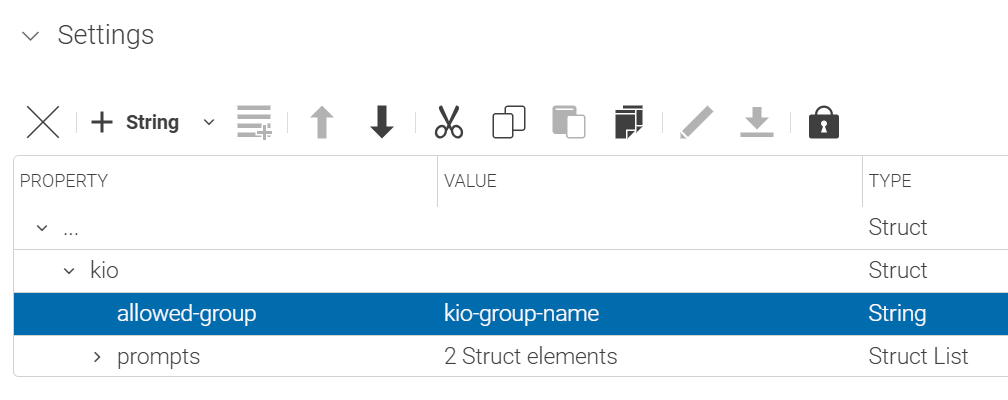
To restrict access to a single user group, use the allowed-group property:
-
Property name:
allowed-group -
Property type: String
-
Description: Specifies a single user group allowed to use KIO functionality
Multiple Groups Configuration
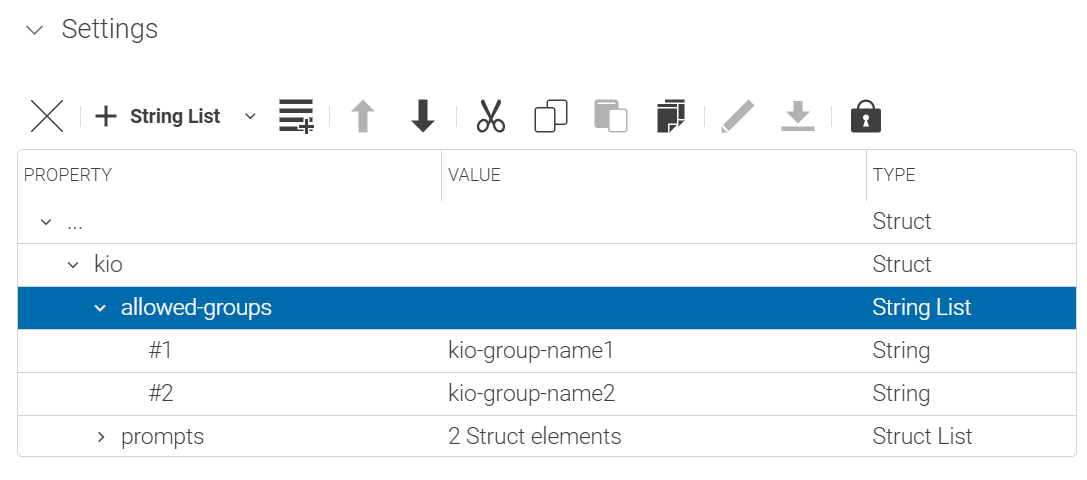
To restrict access to multiple user groups, use the allowed-groups property:
-
Property name:
allowed-groups -
Property type: String List
-
Description: Specifies multiple user groups allowed to use KIO functionality
Access Control Behavior
Group-based access control works as follows:
-
No groups configured: If neither
allowed-groupnorallowed-groupsproperties are set, all users will have access to KIO functionality. -
Groups specified: If one or both properties are configured, only users who are members of at least one configured group will have access to KIO features.
-
Access denied: If a user is not a member of any allowed group, the KIO plugin will not be instantiated in CoreMedia Studio, effectively preventing access to KIO functionality.
|
Users must be members of at least one of the configured groups to access KIO. Group membership is evaluated when the user logs into CoreMedia Studio. If a configured group name does not exist or is invalid, KIO will not be loaded for any user. |
Playbook Manager Access Control
Creating, editing, and duplicating playbooks in KIO is restricted to users with the playbook manager role. All other users can view the list of available playbooks in read-only mode.
|
This setting only controls the KIO frontend. Since playbooks are standard CMS documents, any CMS user with sufficient folder permissions can still create or modify them directly in Studio, regardless of this configuration. |
To configure which groups qualify as playbook managers, add the playbook-manager-groups property to the global KIO settings document at /Settings/Options/Settings/KIO:
-
Property name:
playbook-manager-groups -
Property type: String List
-
Description: Specifies the user groups allowed to create, edit, and duplicate playbooks.
|
When specifying a group, include the domain suffix if the group has one (for example, |
Access Behavior
-
No groups configured: If
playbook-manager-groupsis not set, only administrators are considered playbook managers. -
Groups specified: If
playbook-manager-groupsis configured, only members of at least one of the listed groups are playbook managers. -
Non-managers: Users without the playbook manager role can view the playbook list in KIO but cannot create, edit, or duplicate playbooks.
Content Variant Support
KIO can recognize and manage Content Variants, enabling users to create and update variants tied to specific topics.
|
Content Variant Support requires CMCC 2512.0 or later. |
This feature is disabled by default. To enable it, set the following property in your KIO backend configuration:
A corresponding environment variable configuration looks like this:
KIO_BACKEND_CONTENT_VARIANTS_ENABLED=trueWhen enabled, KIO uses the default BlueprintVariantConfigurationProperties to determine how variants are created and associated with topics.
-
Standard Blueprint setups: No additional configuration is required. The defaults work out of the box.
-
Custom setups: If your project deviates from the standard Blueprint, refer to
BlueprintVariantConfigurationPropertiesto adapt the variant configuration to your content model.
Configuring Parallel Agent Execution
KIO’s backend uses a multi-agent architecture that can run several agents in parallel for all tasks that can be parallelized, such as generating multiple content variants simultaneously or the processing of bulk/multi-item requests. This can significantly improve performance for large-scale content generation. See Multi-Agent Architecture and Parallel Execution for a full explanation of the orchestrator/agent model and its effect on response time and AI resource consumption. Administrators can tune this behavior for their deployment via the following KIO backend configuration properties.
Maximum Parallel Agents per Request
This is the main knob for tuning response time for bulk/multi-item requests. It caps how many agents may run in parallel for a single bulk/multi-item request.
-
Property name:
kio.backend.max-parallel-agents-per-request -
Property type: Integer
-
Default:
3
kio.backend.max-parallel-agents-per-request=3-
Set to
1or smaller basically disables parallel execution: every request is then handled by a single agent running synchronously. -
Raise the value (for example, to
5or higher) to reduce response time for large bulk/multi-item requests.
|
Raising this value does not necessarily increase AI resource (token) consumption: while more parallel agents add orchestration overhead, each agent also works with a smaller, more focused context (fewer items per chunk), which can offset that overhead. The net effect depends on the request. We recommend monitoring actual AI resource consumption for your workloads (for example, via your LLM provider’s usage/cost dashboard) when changing this value. |
Maximum Items per Bulk Operation
This caps how many content items KIO will accept as input for a single bulk operation overall (across all chunks), independent of how many run in parallel.
-
Property name:
kio.backend.max-bulk-items -
Environment variable:
KIO_BACKEND_MAX_BULK_ITEMS -
Property type: Integer
-
Default:
50
kio.backend.max-bulk-items=50|
KIO is designed for everyday editorial tasks on a bounded set of content items, not for large-scale content migrations that could run for hours or days. Very large or long-running batch operations remain out of scope for KIO — see Introduction to KIO. |
Is this page useful?