Deleting Variants
Learn how to remove a variant from a baseline content item.
Delete a variant when it is no longer needed. Deleting a variant removes the content item and its link from the baseline. You have two ways to delete the variant.
-
Delete the variant directly from the Personalization tab of the baseline content item
-
Delete the variant like any other content item in CoreMedia Studio
Only the first way is described in this article.
Delete a variant from Personalization Tab of the baseline content item
Prerequisite
If the variant is currently published, you must withdraw it before deleting. If the variant is used in an active A/B test, end the A/B test first before deleting the variant.
Steps
-
Open the baseline content item that contains the variant you want to delete.
-
Open the Personalization tab.
-
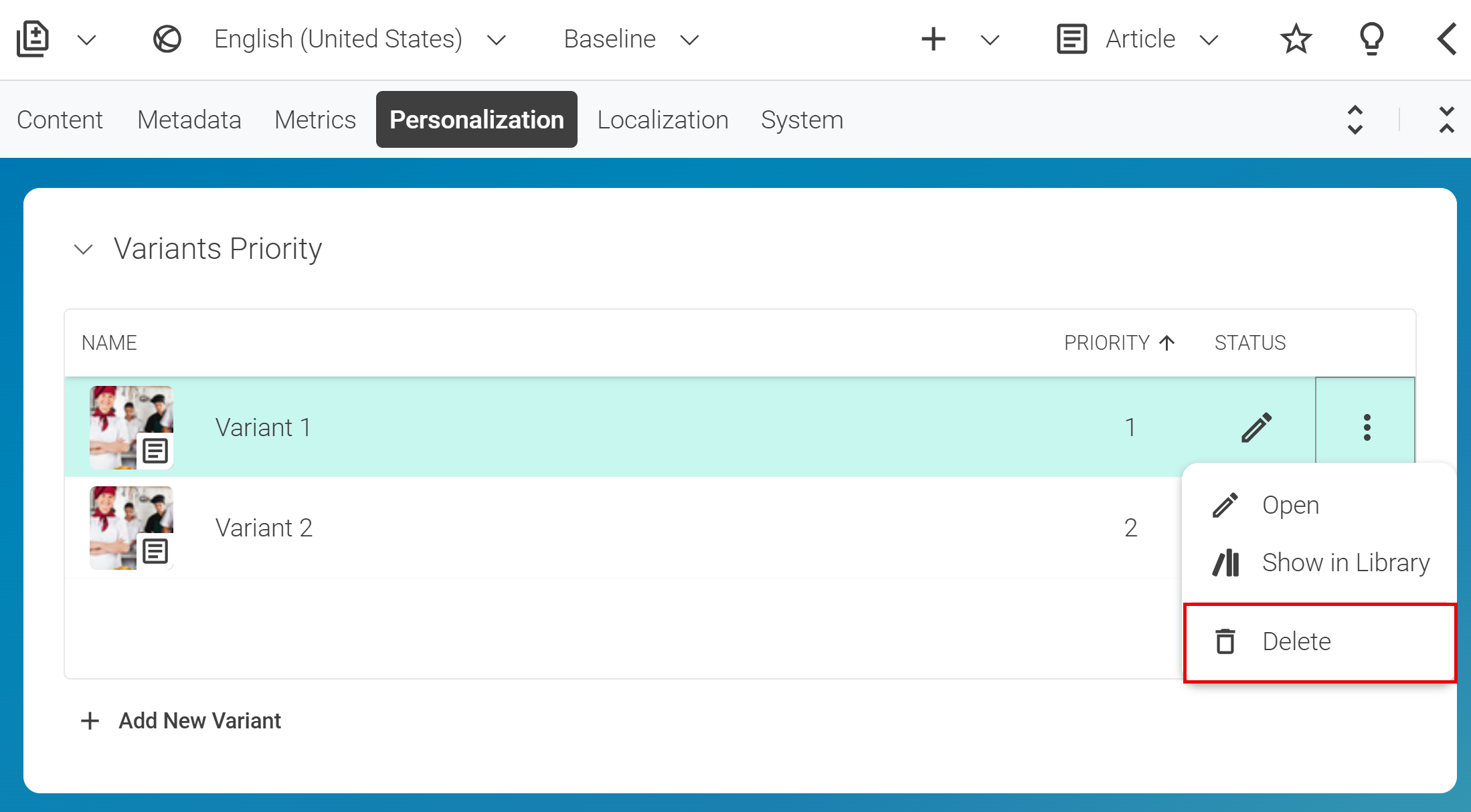
In the list of variants, click the three dots after the variant you want to delete
-
Select Delete from the context menu and confirm the deletion when prompted.

Result
After deletion, the variant is removed from the Personalization tab and the content item is deleted from the repository.
Note: Although you deleted the variant from the baseline content item, you haven’t changed the state of the baseline content item itself. The baseline content item remains unchanged and needs not to be published again.