Selecting a Winner for an A/B Test
Learn how to review A/B test results and select a winner.
After an A/B test has run for the configured duration, you can review the results and select a winner. Depending on how the test was configured, the winner is selected either manually or automatically.
When the winner is the
Prerequisites
-
Have a completed or running A/B test.
Steps
Manual Winner Selection
If the test is configured for manual winner selection:
-
Open the A/B test from the A/B Tests node in the Library tree view.
-
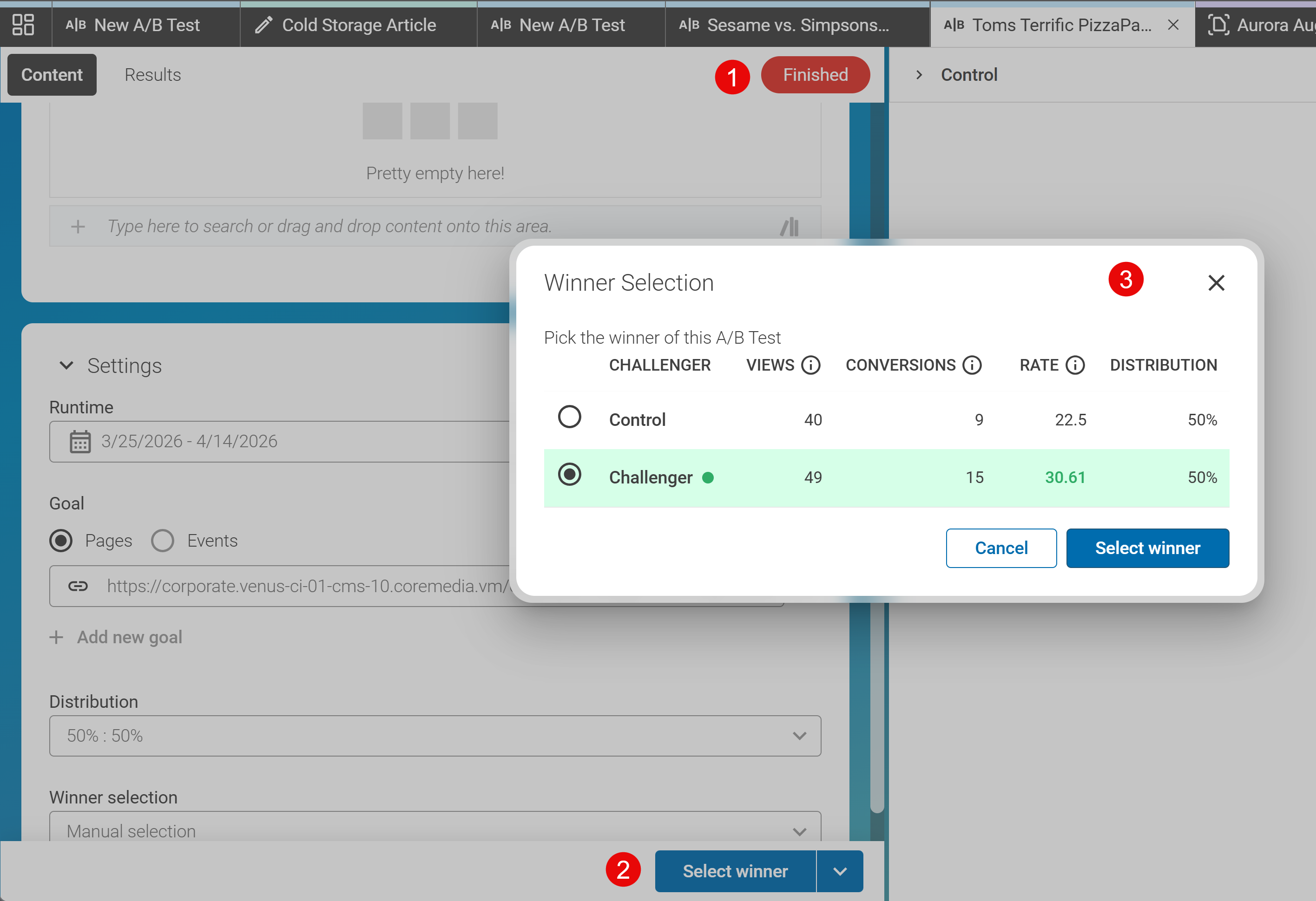
When the test is finished, it shows Finished (1) at the top of the A/B Test. Click the Select winner button (2) at the bottom. The Winner Selection dialog (3) opens.
The dialog shows the performance of the baseline and the variants based on the defined goal. VIEWS shows how often Control and each Challenger were shown to visitors, CONVERSIONS shows the number or reached goals and RATE shows the percentage of reached goals to total views.
-
Check the box of the version you want to select as the winner. You can only select one winner, either the Control or one of the Challengers.
-
Click Select Winner to confirm your selection. The A/B test is now marked as completed, and the winning version is displayed to all visitors going forward.

Automatic Winner Selection
If the test is configured for automatic winner selection:
-
The system automatically selects the winner once the test duration has elapsed.
-
Open the A/B test to review the results and see which version was selected.
-
No further action is required.
Result
After selecting a winner:
-
If the winner is a challenger, aka a variant, the changed properties of that variant are applied to the baseline content item, effectively making the variant the new default version. If the winner is the control, aka the baseline, no changes are made to the content items. The changes are not automatically published!
-
The winning version is displayed to all visitors going forward.
-
The A/B test is marked as completed.
-
You can review the final results at any time by opening the test from the Library.
Tip: If you are not satisfied with the automatic selection, you can still override the result manually, provided the test is still accessible.