


Studio Developer Manual / Version 2101
Table Of Contents
Annotated LinkLists
are stored in a Struct Property. This is in contrast to a plain
LinkList
which is stored in a LinkList Property.
Therefore, when introducing a new Annotated LinkList, the doctype definition needs to have an XML property
with the Struct grammar.
<XmlProperty Name="structList" Grammar="coremedia-struct-2008" extensions:translatable="true"/>
The property editor for an annotated LinkList usually is a LinkListPropertyField with the following
configuration:
linkListWrapper: An instance of
StructLinkListWrapper, that wraps the annotated listrowWidget: An
AnnotatedLinkListWidgetthat contains items which implementIAnnotatedLinkListForm
Existing Annotated LinkLists can be extended with custom forms by using the
AddItemsPlugin
on the AnnotatedLinkListWidget.
The custom forms need to implement the interface
IAnnotatedLinkListForm
and can then write new annotations using extendBy of the
ValueExpression
provided by the settingsVE.
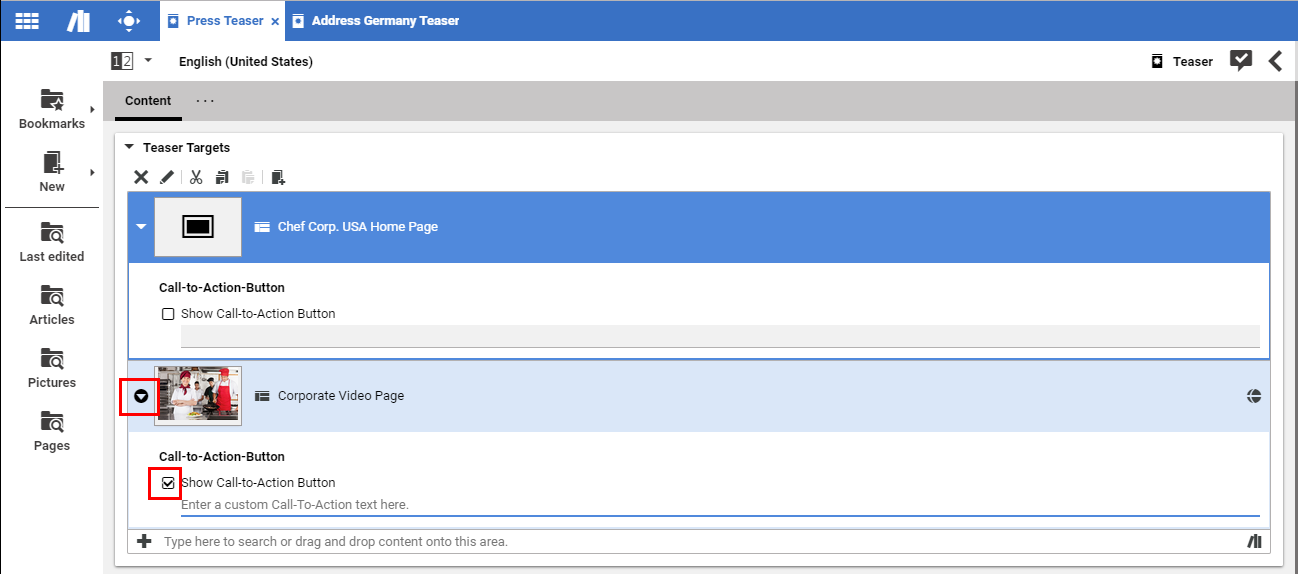
The row expander of an Annotated LinkList changes its appearance based upon the state of its row
widget(s) (see Figure 7.7, “
Annotated LinkList with item with changed default value
”, the changed parts are highlighted with red border).
That is, if there is at least one row widget instance in a row which differs from the default state, the row expander
icon gets inverted.
So the studio user gets a hint that at least one of the row widget instances has been changed.
To determine if a row widget differs from its default state, every IAnnotatedLinkListForm may provide
a custom method with the following signature:
isAnnotated(annotatedLinkListProvider:IAnnotatedLinkListProvider, rowIndex:Number):Boolean
These custom methods are set via the LinkListPropertyField config option
rowWidgetsAnnotatedPredicates.
If there are no custom methods, a default strategy is chosen to determine if the row expander has to change its
appearance.
If there is at least one custom method, then the default strategy is ignored.
