Metric Definition
List of available metrics with definition.
| Metric | Symbol | Definition |
|---|---|---|
| Count | # | Number of occurrences of a subject. For example, number of contacts or number of leads. |
| Sum | ∑ | Total of all values. Sum of all the values in a count column. |
| Average | µ | Sum of all values divided by the number of units. Units can be days, months or other. |
| DAverage | DAvg | Sum of all values divided by the number of units. Units can be days, months or other. |
| 95th percentile | .95 | Value below which 95% of the data falls. |
| Percentage | % | Number of occurrences of a subject in relation to the total number of occurrences. For example, percentage of contacts or percentage of leads. |
| Maximum | M | Highest value in a set of data. |
| Minimum | m | Lowest value in a set of data. |
The following sections explain the metrics listed in the previous table with examples. Note that you can click on the images to enlarge them.
Count and Percentage
The following image shows the number and percentage of contacts that the contact center handled during four weeks:
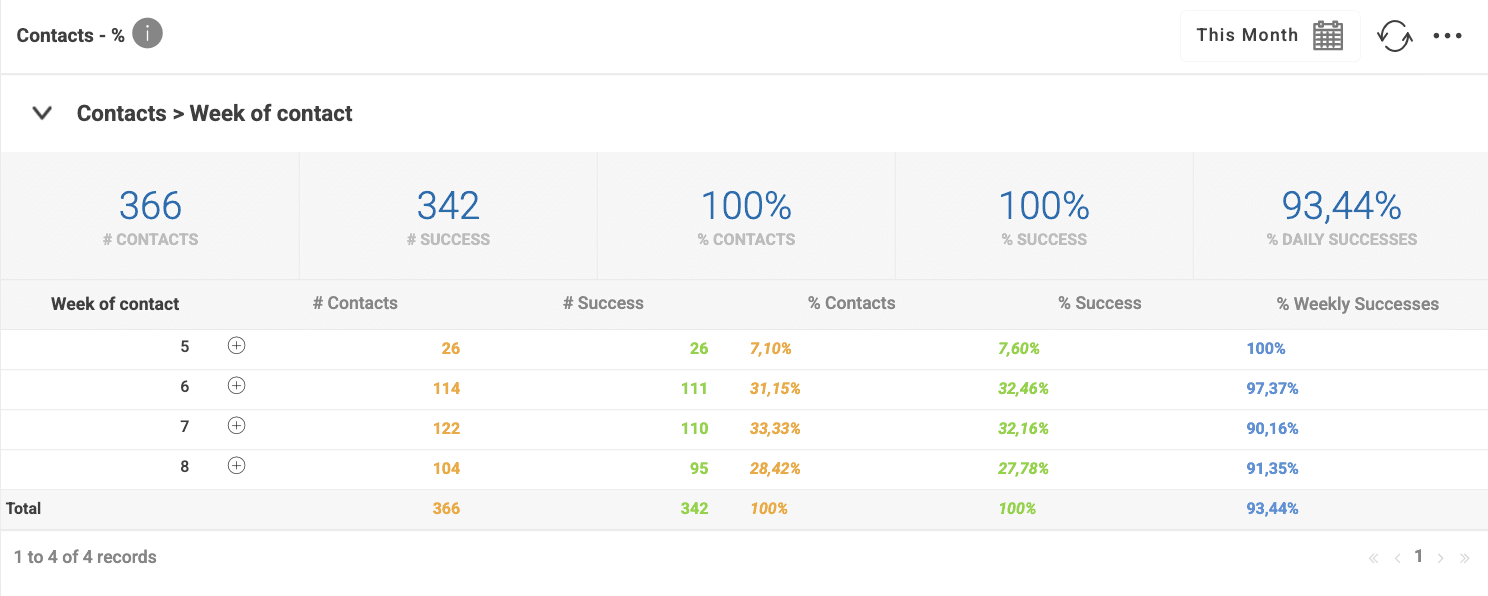
| Week of contact | Week of contact is the aggregation field. It represents the week number when the contact occurred. Values in the other columns are aggregated by the week of contact. |
| # Contacts | Number of contacts that the contact center handled in each week. |
| # Success | Of the handled contacts, this represents the number of contacts that the contact center classified as successful. |
| % Contacts | Percentage of contacts that the contact center handled each week. |
| % Success | Of the handled contacts, this represents the percentage of contacts that the contact center classified as success each week. |
| % Weekly Success | This is a calculated metric and, of the number of contacts handled each week, it represents the percentage of contacts that the contact center classified as success in each week. |
% Percentage
Contact Center and Engagement Studio calculates the percentage as follows:
    Number of occurrences of a subject
% = ---------------------------------- * 100
       Total number of occurrences
The following table shows how the Contact Center and Analytics Studio calulates % Contacts and % Success are columns:
| % Contacts | % Success | % Weekly Success | ||
|---|---|---|---|---|
| (Number of weekly contacts/Total number of contacts) * 100 | (Number of weekly contacts classified as success/Total number of contacts classified as success) * 100 | (Number of weekly contacts classified as success/Number of weekly contacts) * 100 | ||
| (26/366) * 100 = 7.10 % | (26/366) * 100 = 7.10 % | (26/26) * 100 = 100% | ||
| (114/366) * 100 = 31.15 % | (111/366) * 100 = 30.33 % | (111/114) * 100 = 97.37% | ||
| (122/366) * 100 = 33.33 % | (110/366) * 100 = 30.05 % | (110/122) * 100 = 90.16% | ||
| (104/366) * 100 = 28.42 % | (95/366) * 100 = 27.05 % | (95/104) * 100 = 91.35% |
Daily Average
The following image shows the number of contacts that the contact center handled by day:
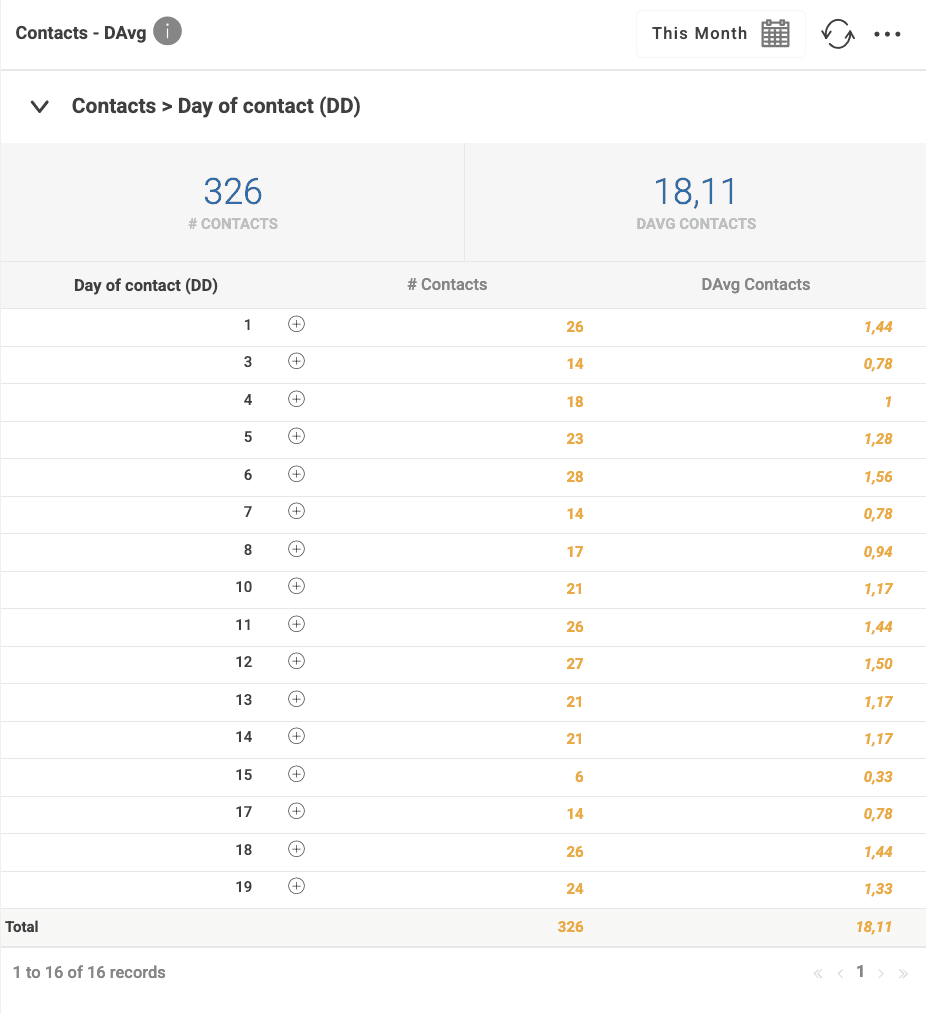
| Day of contact (DD) | Day of contact is the aggregation field. It represents the day of the the month when the contact occurred. For example, the images shows that the contact center handled contacts in day and 3, but there weren't handled contacts in day 2. |
| # Contacts | Number of contacts that the contact center handled in each week. |
| DAvg Contacts | Daily average. Average number of contacts per day. |
Contact Center and Engagement Studio calculates the daily average as follows:
       Number of occurrences of a subject
DAvg = ----------------------------------
              Last day - First day
The following table shows the Contact Center and Analytics Studio calculates DAvg Contacts column:
| Day of contact (DD) | DAvg Contacts |
|---|---|
| 1 | 26 / (19-1) = 1.44 |
| 3 | 14 / (19-1) = 0.78 |
| 4 | 18 / (19-1) = 1 |
| 5 | 23 / (19-1) = 1.28 |
| 6 | 28 / (19-1) = 1.56 |
| 7 | 14 / (19-1) = 0.78 |
| 8 | 17 / (19-1) = 0.94 |
| 10 | 21 / (19-1) = 1.17 |
| 11 | 26 / (19-1) = 1.44 |
| 12 | 27 / (19-1) = 1.5 |
| 13 | 21 / (19-1) = 1.17 |
| 14 | 21 / (19-1) = 1.17 |
| 15 | 6 / (19-1) = 0.33 |
| 17 | 14 / (19-1) = 0.78 |
| 18 | 26 / (19-1) = 1.44 |
| 19 | 24 / (19-1) = 1.33 |
The following image shows the number that are shown in the previous image aggregated by week:
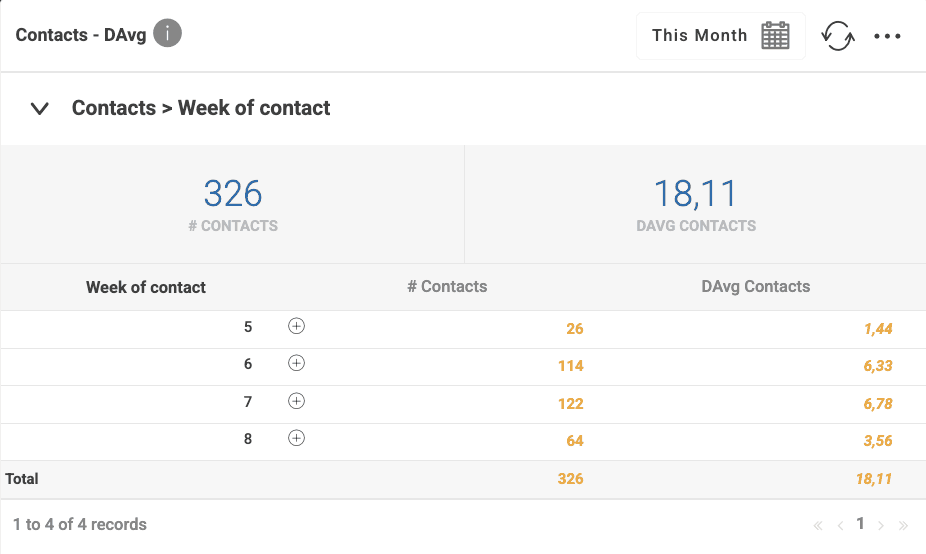
The previous image shows contacts aggregated by week. However, the Contact Center and Engagement Studio calculates the daily average using the number of days.
The following table shows the Contact Center and Analytics Studio calculates DAvg Contacts column:
| Week of contact | DAvg Contacts |
|---|---|
| 5 | 26 / (19-1) = 1.44 |
| 6 | 114 / (19-1) = 6.33 |
| 7 | 122 / (19-1) = 6.78 |
| 8 | 64 / (19-1) = 3.56 |
Sum, Average, Minimum, and Maximum
The following images show the sum, average, minimum, maximum, and 95th percentile of the duration of contacts aggregated by day and by CoreMedia CID:
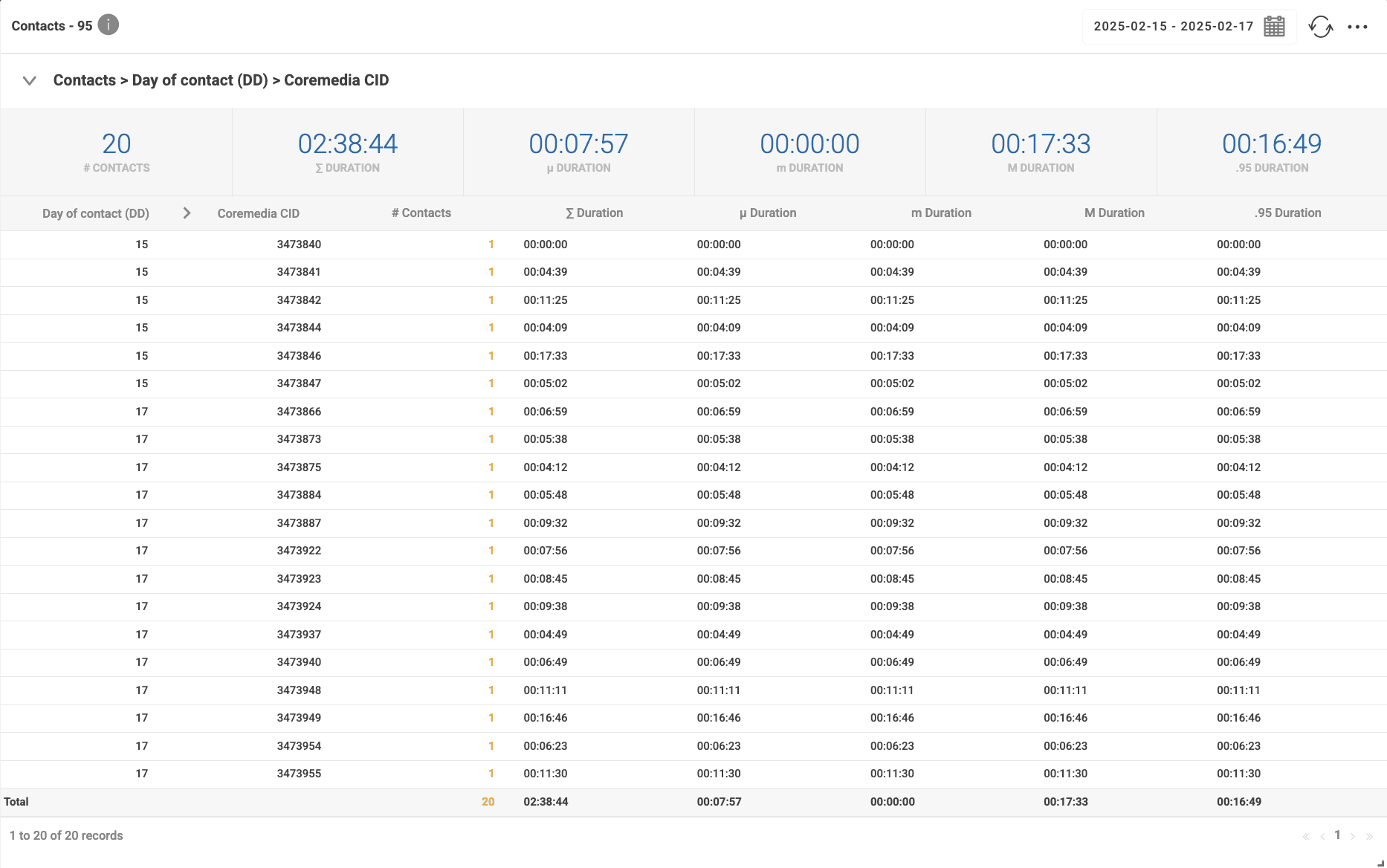
| Day of contact (DD) | Day of contact is the aggregation field. It represents the day of the the month when the contact occurred. For this example, we selected day 15, 16, and 17. |
| CoreMedia CID | CoreMedia unique identifier of the contact. Using the CoreMedia CID to aggregate results allows to view the duration of each contact. |
| # Contacts | Number of contacts that the contact center handled per day and per contact. |
| ∑ Duration | Sum of the durations of all contacts the Contact Center and Analytics Studio handled per day and per contact. |
| µ Duration | Average of the durations of all contacts the Contact Center and Analytics Studio handled per day and per contact. |
| m Duration | Minimum duration of a contact per day and per contact. |
| M Duration | Maximum duration of a contact per day and per contact. |
| .95 Duration | Duration of the contacts in .95 percentile per day and per contact. |
The following image shows the same data as the image above, but aggregated by day:
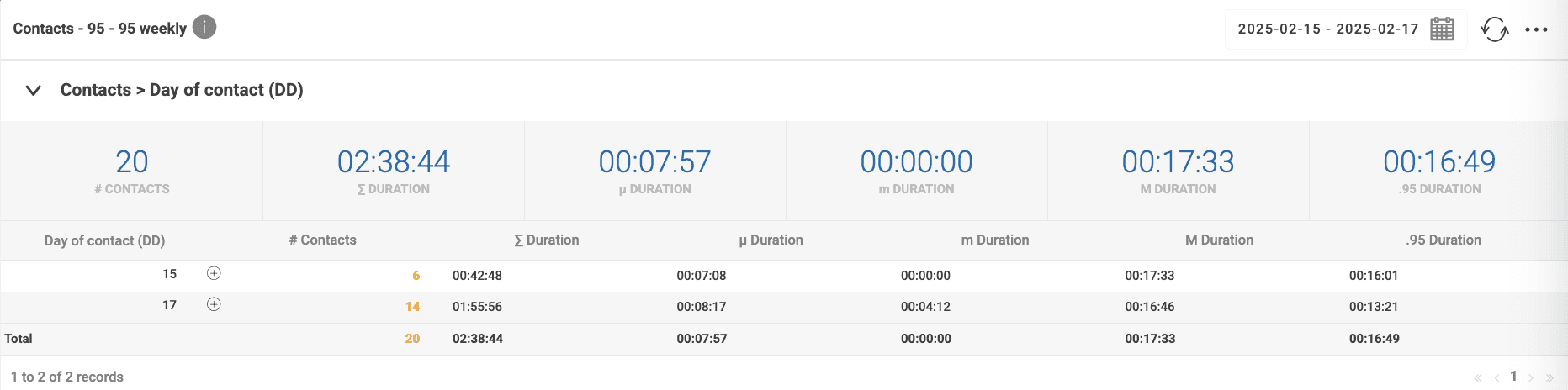
| Day of contact (DD) | Day of contact is the aggregation field. It represents the day of the the month when the contact occurred. For this example, we selected day 15, 16, and 17. |
| # Contacts | Number of contacts that the contact center handled per day. |
| ∑ Duration | Sum of the durations of all contacts the Contact Center and Analytics Studio handled per day. |
| µ Duration | Average of the durations of all contacts the Contact Center and Analytics Studio handled per day. |
| m Duration | Minimum duration of a contact per day. |
| M Duration | Maximum duration of a contact per day. |
| .95 Duration | Duration of the contacts in .95 percentile per day. |
Sum
Contact Center and Engagement Studio calculates the sum as follows:
∑ = Durarion1 + Durarion2 + ... + DurarionN
In the second image, the Contact Center and Analytics Studio calculates the sum of the durations of the contacts as follows:
∑ = 00:42:48 + 01:55:56 = 02:38:44
Average
Contact Center and Engagement Studio calculates the average as follows:
    Durarion1 + Durarion2 + ... + DurarionN
∑ = ---------------------------------------
                        N
In the previous equation, N is the number of records.
The following table shows the Contact Center and Analytics Studio calculates µ Duration column:
| Day of Contact (DD) | µ Duration |
|---|---|
| 15 | (00:00:00 + 00:04:39 + 00:11:25 + 00:04:09 + 00:17:33 + 00:05:02)/6 = 00:07:43 |
| 17 | (00:06:59 + 00:05:38 + 00:04:12 + 00:05:48 + 00:09:32 + 00:07:56 + 00:08:45 + 00:09:38 + 00:04:49 + 00:06:49 + 00:11:11 + 00:16:46 + 00:06:23 + 00:11:30)/14 = 00:08:45 |
| Total | (00:00:00 + 00:04:39 + 00:11:25 + 00:04:09 + 00:17:33 + 00:05:02 + 00:06:59 + 00:05:38 + 00:04:12 + 00:05:48 + 00:09:32 + 00:07:56 + 00:08:45 + 00:09:38 + 00:04:49 + 00:06:49 + 00:11:11 + 00:16:46 + 00:06:23 + 00:11:30)/20 = 00:07:56 |
Minimum
The minimum duration in day 15 is 00:00:00 and in day 17 is 00:04:12.
The global minimum duration is 00:00:00.
Maximum
The maximum duration in day 15 is 00:17:33 and in day 17 is 00:16:46.
The global maximum duration is 00:17:33.
95th percentile
The following image includes the 95th percentile of the duration of contacts aggregated by day and by CoreMedia CID:
To calculate the 95th percentile, Contact Center and Analytics Studio sorts the contact durations as shown in the following table:
| Day of contact (DD) | Duration | Position (k) |
|---|---|---|
| 15 | 0:00:00 | 1 |
| 15 | 0:04:09 | 2 |
| 17 | 0:04:12 | 3 |
| 15 | 0:04:39 | 4 |
| 17 | 0:04:49 | 5 |
| 15 | 0:05:02 | 6 |
| 17 | 0:05:38 | 7 |
| 17 | 0:05:48 | 8 |
| 17 | 0:06:23 | 9 |
| 17 | 0:06:49 | 10 |
| 17 | 0:06:59 | 11 |
| 17 | 0:07:56 | 12 |
| 17 | 0:08:45 | 13 |
| 17 | 0:09:32 | 14 |
| 17 | 0:09:38 | 15 |
| 17 | 0:11:11 | 16 |
| 15 | 0:11:25 | 17 |
| 17 | 0:11:30 | 18 |
| 17 | 0:16:46 | 19 |
| 15 | 0:17:33 | 20 |
Then, it uses the following formulas:
I = .95 * (N - 1) + 1
k = floor(I)
d = decimal_part(I)

.95 Percentile = Xk + d * (Xk+1 - Xk)
Where:
Iis the position of the 95th percentile.Nis the number of values in the list.kis the position in the list.dis the value used for the interpolation.Xkis the value in the positionk.Xk+1is the value in the positionk+1.
Note that, if the value calculated for I is an integer, the value of the 95th percentile is the value in the position Xi.
For the values in the table above, Contact Center and Analytics Studio calculates the 95th percentile as follows:
I = .95 * (20 - 1) + 1 = 19.05
k = floor(19.05) = 19
d = decimal_part(19.05) = 0.05

.95 Percentile = X19 + 0.05 * (X20 - X19) = 0:16:46 + 0.05 * (0:17:33 - 0:16:46) = 0:16:49
The following image shows the percentile for day 15 and day 17:
Day 15
| Day of contact (DD) | Duration | Position (k) |
|---|---|---|
| 15 | 0:00:00 | 1 |
| 15 | 0:04:09 | 2 |
| 15 | 0:04:39 | 3 |
| 15 | 0:05:02 | 4 |
| 15 | 0:11:25 | 5 |
| 15 | 0:17:33 | 6 |
For the values in the table above, Contact Center and Analytics Studio calculates the 95th percentile as follows:
I = .95 * (6 - 1) + 1 = 5.75
k = floor(5.25) = 5
d = decimal_part(5.25) = 0.75

.95 Percentile = X5 + 0.75 * (X6 - X5) = 0:11:25 + 0.75 * (0:17:33 - 0:11:25) = 0:16:01
Day 17
| Day of contact (DD) | Duration | Position (k) |
|---|---|---|
| 17 | 0:04:12 | 1 |
| 17 | 0:04:49 | 2 |
| 17 | 0:05:38 | 3 |
| 17 | 0:05:48 | 4 |
| 17 | 0:06:23 | 5 |
| 17 | 0:06:49 | 6 |
| 17 | 0:06:59 | 7 |
| 17 | 0:07:56 | 8 |
| 17 | 0:08:45 | 9 |
| 17 | 0:09:32 | 10 |
| 17 | 0:09:38 | 11 |
| 17 | 0:11:11 | 12 |
| 17 | 0:11:30 | 13 |
| 17 | 0:16:46 | 14 |
For the values in the table above, Contact Center and Analytics Studio calculates the 95th percentile as follows:
I = .95 * (14 - 1) + 1 = 13.35
k = floor(13.35) = 13
d = decimal_part(13.35) = 0.35

.95 Percentile = X13 + 0.35 * (X14 - X13) = 0:11:30 + 0.35 * (0:16:46 - 0:11:30) = 0:13:21
Calculating change rates in a multi-dimension metrics panel
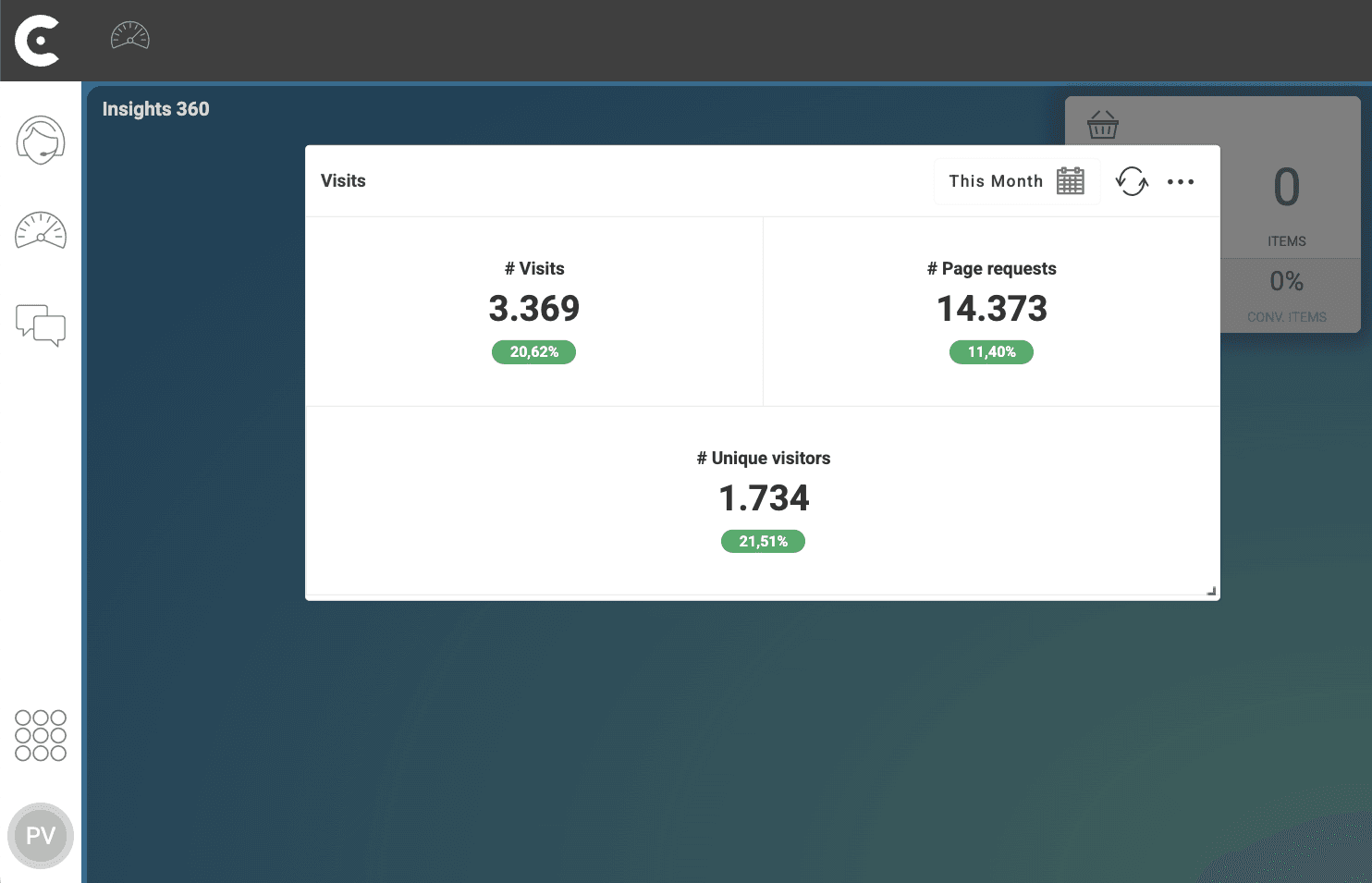
The percentage below each metric represents the change rate between the values of the metric in two consecutive periods. To calculate the change rates of the metrics, Contact Center and Analytics Studio compares the values of the metrics in period N and period N-1.
Contact Center and Analytics Studio calculates the change rates of the metrics based on the following formula:
     100 * (metric in period 2 - metric in period 1)
% =  ----------------------------------------------
                  metric in period 1
In the following image, the metric panel shows the number of visits, pages requests, and unique visitors of the documentation site during the month of February 2025.
In the following image, the metric panel shows the number of visits, pages requests, and unique visitors of the documentation site during the month of January 2025.
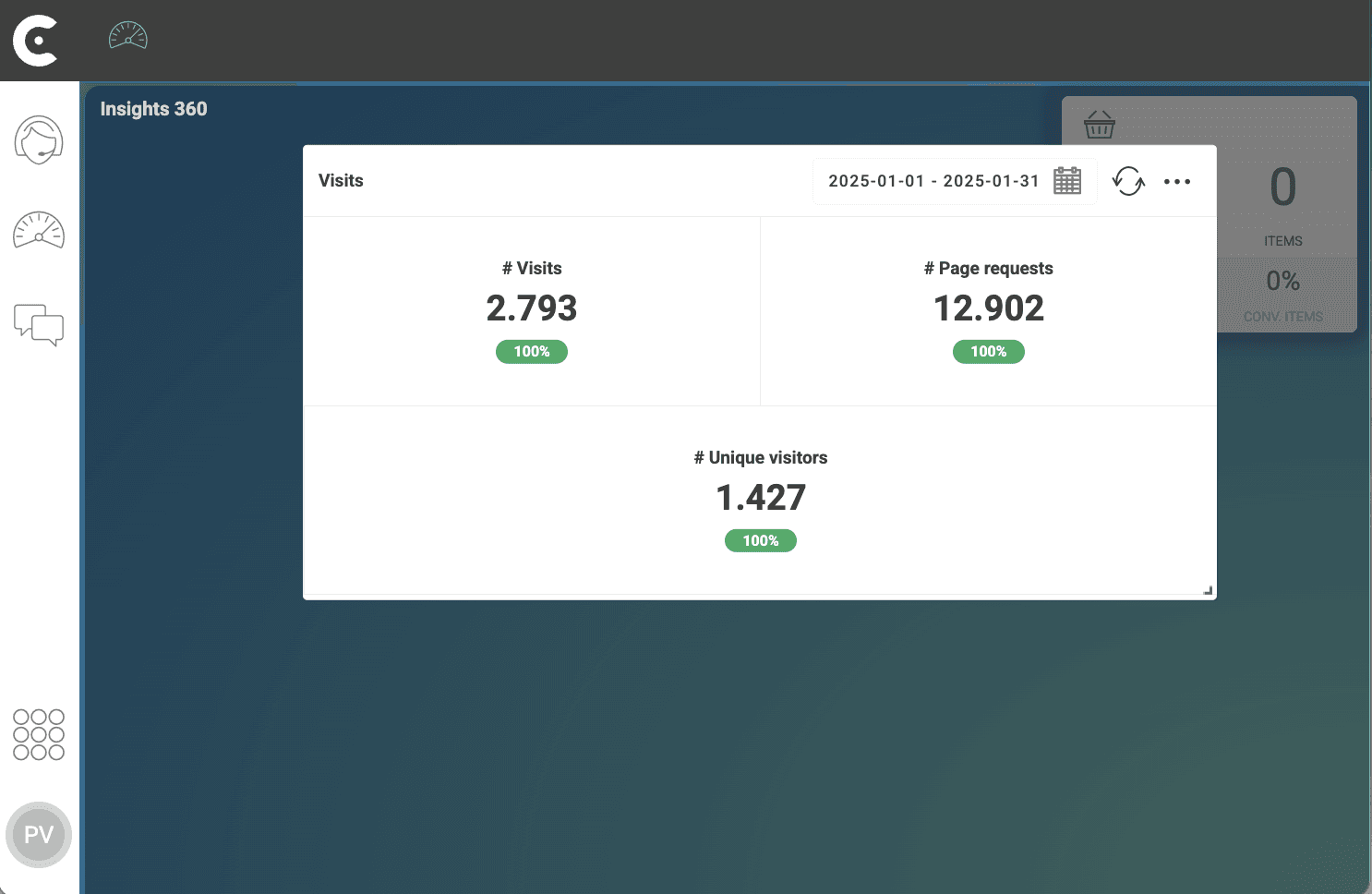
Comparing the values of the metrics in February 2025 and January 2025,Contact Center and Analytics Studio calculates change rates in the first image as follows:
| Period | January 2025 | February 2025 | % Change |
|---|---|---|---|
| # Visits | 2.793 | 3.369 | +100 * (3.369 - 2.793) / 2.793 = 20.62%+ |
| # Page Requests | 12.902 | 14.373 | +100 * (14.373 - 12.902) / 12.902 = 11.40%+ |
| # Unique Visitors | 1.427 | 1.734 | +100 * (1.734 - 1.427) / 1.427 = 21.51%+ |