Integrations
Process of connecting Engagement Cloud with different systems, applications, or components to work together and share data or functionality.
Version: 1.1
As we embrace the digital age, we find ourselves at the forefront of a transformative era in the digital landscape. Across the globe, businesses are on a mission to redefine the customer experience, transcending the mere delivery of products and services. The goal of this evolution is to establishing genuine connections with individuals at every touch point of their journey.
At CoreMedia, we are unwavering in our commitment to fostering these meaningful connections. Our integration solutions play a pivotal role in this endeavor. We understand that the contemporary business landscape demands holistic, multifaceted experiences that span the realms of sales, service, marketing, and beyond. CoreMedia stands as the vanguard of customer engagement platforms, empowering organizations to seamlessly integrate and unite these customer experiences across every facet of their operations.
In today’s interconnected and rapidly evolving digital environment, integrating with external providers has evolved into a strategic necessity for businesses spanning various industries. Whether you’re a tech startup, a seasoned enterprise, or a dedicated service provider, the integration of your platform with external providers offers a diverse array of advantages. These integrations become a driving force for innovation, an avenue to enhance functionality, and a catalyst for an enriched user experience.
This document serves as a guide to elucidate the primary reasons and benefits of such integrations, emphasizing why they should constitute an essential element of your overarching business strategy. At CoreMedia, we combine our commitment to meaningful connections with the power of external provider integrations, enabling you to chart a course towards a more engaging and prosperous digital future.
1.1. What is an integration?
An integration, in the context of technology and software, refers to the process of connecting different systems, applications, or components to work together and share data or functionality. Integrations enable these disparate systems to communicate with each other and exchange information in a seamless and automated manner.
Key characteristics of integrations include:
-
Data Exchange: Integrations often involve the exchange of data between systems. This can include sending, receiving, or synchronizing data in real-time or through batch processes.
-
Functionality Sharing: Integrations can also involve sharing specific functions or services between systems. For example, an e-commerce website may integrate with a payment gateway to process payments.
-
Automation: Integrations automate processes that would otherwise require manual data entry or redundant tasks. This can improve efficiency and reduce the risk of errors.
-
Interoperability: Integrations allow different technologies or applications to work together seamlessly. This is especially important in complex software ecosystems.
-
Customization: Many integrations can be customized to meet specific business needs. This may involve configuring data mappings, triggers, and actions.
Examples of integrations include connecting a customer relationship management (CRM) system with an email marketing platform, integrating an e-commerce website with a shipping and logistics system, or linking an enterprise resource planning (ERP) system with an inventory management system.
1.2. Why should we integrate with external entities or providers?
Integration with external entities or providers for data sharing and retrieval is a strategic move that can enhance your platform’s functionality, improve user experiences, and drive cost efficiencies, ultimately leading to a more competitive and successful offering.
-
Data Access: External providers often have valuable data or services that can enhance your platform. Integration allows you to access and utilize this data effectively.
-
Specialized Services: External providers may specialize in specific areas, such as payment processing, geo-location services, or social media data. Integrating with them gives you access to these specialized services without developing them in-house.
-
Data Enrichment: Data from external sources can enrich your platform, providing more comprehensive and accurate information to users.
-
Improved Decision-Making: Access to external data can lead to better-informed decisions and more personalized user experiences.
-
Cost Efficiency: Integrating with external providers can be more cost-effective than developing and maintaining similar services internally.
-
Time Savings: Integration reduces development time and accelerates the deployment of new features and functionalities.
-
Scalability: As your user base grows, external providers can often scale their services to meet increased demand, ensuring your platform remains responsive.
-
Focus on Core Competencies: Integration allows your team to concentrate on core features unique to your platform, rather than investing time in non-core services.
-
Stay Current: External providers continuously update and improve their services, ensuring your platform remains up to date and competitive.
-
Enhanced User Experience: Integrating external data can lead to a richer and more satisfying user experience, increasing user engagement and satisfaction
2. CoreMedia Integrations
In line with the principles of integrability and composability (where composable systems are built in a way that components can be easily connected, rearranged, or replaced), CoreMedia is committed to enhancing efficiency, delivering superior experiences, and enabling effortless customization and adaptation of our solutions to meet the unique needs of our customers.
CoreMedia has the following methods to integrate solutions (the choice depends on the specific project requirements and the technology involved):
-
REST API (Representational State Transfer Application Programming Interface): CoreMedia REST API provides programmatic access to some of the CoreMedia functionalities and services.
-
Javascript API: Enabling client-side interaction with CoreMedia platform.
-
Webhooks:Webhooks are HTTP-based triggers that allow one application to automatically send information to another when specific events occur. They are useful for notifying external systems about real-time actions.
-
CoreMedia SFTP Service: Exchange of files - contact lists, reports - in a secure environment.
-
CoreMedia Integration app: Pre-packaged integration connectors built in CoreMedia platform and available to be setup and enabled within a App.
-
CoreMedia Export App: App responsible to export CoreMedia data
-
CoreMedia Custom App: Custom-built applications within CoreMedia’s backoffice for direct integration with internal systems, enhancing functionality tailored to specific client needs.
-
CoreMedia DataSources: Connects visitor profiles to client systems, enabling real-time data enrichment from various sources.
The choice of integration approach depends on the project’s complexity, the systems involved, the integration objectives and where the touchpoint need to be triggered. Often, a combination of these methods is used to create a comprehensive integration solution.
2.1. CoreMedia events
CoreMedia’s event-oriented architecture is a powerful and flexible solution designed to enhance data integration and actions with external providers. It prioritizes real-time responsiveness, scalability, and adaptability, making it an ideal choice for organizations seeking to streamline operations and provide top-notch customer experiences.
This architecture facilitates real-time data exchange, ensuring that interactions and updates happen immediately for up-to-the-minute information and rapid responses. It is highly scalable, making it suitable for growing businesses with dynamic customer interactions. Additionally, its flexibility allows easy adaptation to evolving business requirements and integration needs without major architectural changes.
Asynchronous processing enhances system performance and prevents bottlenecks, while fault tolerance ensures continuous data flow. Loose coupling enables system components to operate independently, reducing the risk of disruptions caused by changes or issues in one part of the system.
CoreMedia’s event-driven architecture excels at integrating data and actions with various providers, both internal and external, offering versatility and adaptability to diverse data sources. Automated triggers streamline processes, boost efficiency, reduce manual intervention, and enhance the customer experience.
Real-time data integration ensures data accuracy and timeliness, crucial for informed decision-making and top-notch customer service. Additionally, monitoring and analytics tools included in the platform allow organizations to track event flow and gain insights into system performance.
In summary, CoreMedia’s event-oriented architecture is a robust solution designed to elevate data integration and action with external providers. It offers real-time responsiveness, scalability, and adaptability, enhancing both customer experiences and operational efficiency.
3. CoreMedia REST API
The CoreMedia API is one of several web interfaces integration touch points that enable you to access your CoreMedia data without relying solely on the user interface. With API access, you have the flexibility to perform various operations and seamlessly integrate CoreMedia into your applications as needed.
By using the CoreMedia API, you can effortlessly create, manage, and search data within the CoreMedia platform by sending HTTP requests to specific endpoints using all the security controls we have in place in the platform. These endpoints are responsible for providing access to various types of information known as resources. Resources in the CoreMedia API allowing you to interact with a wide range of data and functionalities.
The CoreMedia API adopts RESTful architecture, which results in a simple and consistent interface. One of the primary advantages of the CoreMedia API is its ease of use, requiring minimal tooling to access your data.
3.1. Base URL
The base URL for API requests is specific for each CoreMedia geographic zone:
| Zone | URL |
|---|---|
WE1 |
|
WE2 |
|
SA1 |
3.2. Authentication
To make any API call, a customer must have the API Enabled permission turned on. Webservice authentication is done through a "basic access authentication" method. Include the API key or token in the request headers.
The authentication string is comprised of the pair: “WebcareID:AuthToken".
-
WebcareID: unique identification of CoreMedia’s customer;
-
AuthToken: authentication token (unique for each customer).
-
Authentication token example: "[Bt?gN2F3tzcTBMcfBG2cdxh9YCqc&)k".
To obtain an API key or token, please contact our support team.
3.3. Available Endpoints
You can see the list of all methods in the CoreMedia REST API document.
3.4. Request and Response Format
All requests and responses use JSON format.
3.5. Error codes
The API uses standard HTTP status codes to indicate the result of each request.
List of status codes:
| Zone | URL |
|---|---|
400 |
Bad Request The request was unacceptable, often due to missing a required parameter. |
401 |
Unauthorized No valid API key provided. |
403 |
Forbidden The API key doesn’t have permissions to perform the request. |
404 |
Not Found The requested resource doesn’t exist. |
405 |
Method Not Allowed The request was accepted but the specifics http was rejected. |
415 |
Unsupported Media Type Payload format is in an unsupported format.‹ |
500 |
Internal Server Error Something went wrong. |
Special notes, while using the REST API methods, visitor unique identifiers must be managed by the customer’s platform.
If the visitor is authenticated, a token must be provided, as it normally would on the website. If the visitor identifier is encrypted on the website, the same encryption method must be applied. The visitor parameters must be provided to the methods as follows:
-
uuid: Current visitor unique identifier (token)
-
is_uid_authenticated: TRUE.
When the visitor is not authenticated (anonymous), a unique identifier must be generated, based on the device, and used on all requests (the same identifier should be always used on each device). The visitor parameters must be provided to the methods as follows:
-
uuid: Current visitor unique identifier.
-
is_uid_authenticated: FALSE.
4. Javascript API
The CoreMedia JavaScript API, accessible upon the installation of the CoreMedia tag, provides a gateway to a variety of system functionalities, enhancing site interactivity and personalization based on visitor behavior. Key functionalities include:
-
Initiating Calls: Empower your site to start phone calls directly, fostering immediate and seamless communication.
-
Triggering CoreMedia Automations: Activate CoreMedia automations that facilitate interaction with external systems, thereby bridging the gap between your digital presence and the external world.
-
Segment Management: Add or remove visitors from specific segments, allowing for more targeted audience engagement and refined marketing strategies.
-
Enriching Visitor Profiles: Append additional information to a visitor’s profile, enriching their data footprint and enabling more personalized interactions.
-
Activating Campaigns (Interfaces) for Visitors: Crucially, the API allows for the activation of campaigns or interfaces for visitors at specific moments. For instance, if you wish to present a campaign to a visitor at a particular point in a form, this can be programmed via JavaScript to display precisely when needed.
-
Event Tracking for E-commerce Insights: Send events to track e-commerce activities, providing valuable insights into customer interactions. This feature is pivotal for understanding on-site behavior, like items added to a cart.
-
Data-Driven Reactions: The API empowers the system to react based on this data. For example, it can inform an operator about the contents of a customer’s shopping cart or trigger specific campaigns if the cart value exceeds a certain threshold.
To use this api, it is important to be familiar with CoreMedia events, that should be used to inform CoreMedia platform about data, behavior, … Events must be set up in advance within the CoreMedia backoffice.
Example code for appending information to a visitor profile is as follows:
html script type="text/javascript"> (function(){ <var event_info = new Object(); event_info.name = "name"; event_info.email = "email"; event_info.context = "context"; event_info.segment = "segment"; bysideWebcare_event("SetVisitorInfo", event_info); })(); </script>
NOTE:
The interface provides codes similar to the example above, ready to be executed on the site at the appropriate time when the information becomes available.
5. CoreMedia SFTP service
CoreMedia’s Secure File Transfer Protocol (SFTP) service offers a robust and secure solution for data transfer, operating independently from CoreMedia’s core to ensure data integrity and security during transmission.
This service has the following key Features:
-
Secure Data Transfer: Ideal for transferring large data volumes like contact lists and reports, ensuring protection against unauthorized access.
-
Isolation from CoreMedia Core: The service operates isolated from CoreMedia’s core, adding an extra layer of security and minimizing risk to core operations.
-
Immediate File Processing: Files received via SFTP are processed instantly, crucial for operations requiring real-time data updates.
-
Automatic Deletion Post-Processing: Ensures files are automatically deleted from the server after processing, securing sensitive data.
A good example of how this service can be used is a customer that wants to automate daily email marketing dispatches. CoreMedia sets up a dedicated SFTP space for this purpose. When a file is uploaded to this space, it is immediately imported into an email campaign system, and emails are dispatched instantly. This process is especially efficient for bulk data operations, ensuring quick and effective email marketing campaigns.
5.1. Technical Details
-
File Types and Limitations: Supports a wide range of file formats, with size and file type limitations provided during initial setup.
-
Setup and Usage: Straightforward setup process, including establishing secure connections and file transfer parameters.
-
Security Protocols: Utilizes advanced protocols to protect data during transfer, maintaining compliance with data security standards.
5.2. Security and Compliance
-
Data Protection: Top priority is given to data security, with stringent measures protecting against unauthorized access or interception.
-
Compliance with Security Standards: Adheres to major data security standards, ensuring legal and compliance requirements are met.
CoreMedia’s SFTP service is an essential tool for organizations requiring a reliable, secure data transfer solution, particularly beneficial for large-scale operations like email marketing.
6. CoreMedia Integration App
In order to maximize the customer experience, it is necessary for all systems to communicate effectively, unifying information and eliminating silos while optimizing operations. Therefore, we centralize and provide proper visibility to our customers of the integrations that CoreMedia are already conducting.
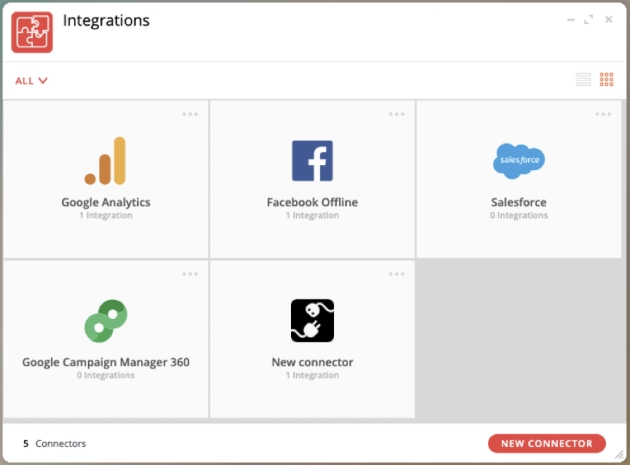
CoreMedia provides an app to its customers that allows connectivity with the following providers using pre-built connectors embedded on CoreMedia platform:
-
Salesforce
-
Google Analytics
-
Google Ads
-
Facebook Offline Conversions
-
Campaign Manager 360
6.1. Salesforce
Salesforce API Connector is a software component or service that facilitates the integration of Salesforce, a popular Customer Relationship Management (CRM) platform, with other applications, systems, or services.
Salesforce provides various APIs that allow you to send and receive different types of information to and from the platform. The type of information you should send using Salesforce APIs depends on your specific business needs and use cases. Here are some common types of information that can be sent using Salesforce APIs:
-
Lead and Contact Data: You can use APIs to create, update, and synchronize lead and contact data. This includes information such as names, email addresses, phone numbers, and job titles.
-
Account and Opportunity Information: Salesforce APIs allow you to manage account and opportunity data, which is essential for managing your sales pipeline and customer relationships.
-
Custom Objects: You can send and retrieve data related to custom objects that you’ve created in Salesforce to store specific information unique to your organization.
-
Event and Activity Data: Salesforce APIs enable you to log and manage events, meetings, and activities associated with leads, contacts, and accounts.
-
Campaign and Marketing Data: You can use APIs to manage marketing campaigns, track the effectiveness of marketing efforts, and capture data on campaign performance.
-
Case and Service Data: Salesforce APIs can be used to create, update, and manage cases and service requests, helping your customer support teams.
-
Report and Dashboard Data: APIs allow you to access data from Salesforce reports and dashboards, which can be used for analytics and reporting in external systems.
-
Custom Application Data: If you’ve developed custom applications in Salesforce, you can send and receive data related to these applications through APIs.
-
Authentication and User Data: APIs are used for authentication and user management, allowing you to manage user accounts and access control.
-
Integration with External Systems: Salesforce APIs are often used to integrate Salesforce with other external systems, such as marketing automation platforms, e-commerce solutions, accounting software, and more.
To integrate with this api, you need to configure a new connection on CoreMedia integration app, indicate the authentication and mapping the respective actions that should be synchronized.
6.2. Google Analytics
The main goal of integrating data with Google Analytics via API is to expand data analysis and visualization capabilities. The Google Analytics APIs allow users to access and manipulate Analytics data programmatically, which opens up a wide range of possibilities for data analysis.
Here are some specific examples of how Google Analytics APIs can be used to integrate data:
-
Website Performance Analysis: APIs can gather data of website traffic, user behavior, and page performance captured by other provider and compile the information to understand how users are interacting with your website, identify popular pages, track conversion rates, and optimize user journeys.
-
E-commerce Analysis: APIs can collect data related to product sales, revenue, and customer behavior to allow an e-commerce performance analyze, track product popularity, monitor cart abandonment rates, and optimize the sales funnel.
-
Marketing data integration:APIs can be used to integrate marketing data, such as loves, interactions in webpage or social media campaign data, with Google Analytics data. This can help businesses evaluate the impact of their marketing campaigns.
-
Sales data integration:APIs can be used to integrate sales data, such as lead and conversion data, with Google Analytics data. This can help businesses better understand their customers' behavior.
-
Customer service data integration:APIs can be used to integrate customer service data, such as ticket and complaint data, with Google Analytics data. This can help businesses improve the quality of their customer service.
The goals of integrating data using the Google Analytics API are typically tied to improving website or app performance, enhancing user experiences, making data-driven decisions, and achieving specific business objectives. The specific information and goals you pursue will depend on your organization’s priorities and strategies.
6.3. Google ADS
The Google Ads API is an application programming interface (API) provided by Google that allows developers to interact with Google Ads (formerly known as Google AdWords) advertising campaigns. It provides a way to automate various aspects of advertising campaign management and retrieve valuable data for analysis and reporting. Here are some key features and capabilities of the Google Ads API:
-
Campaign Management: The API allows you to create, update, and manage advertising campaigns, ad groups, and ads. You can set campaign budgets, bidding strategies, and targeting criteria.
-
Keyword and Ad Management: You can work with keywords, ad designers, and ad extensions, enabling you to optimize ad copy, headlines, and descriptions.
-
Performance Data: Retrieve data on ad performance, including metrics like impressions, clicks, click-through rates (CTR), conversions, cost, and more. This data is valuable for assessing campaign effectiveness.
-
Audience Targeting: Access and manage audience targeting options, including demographics, interests, and behaviors.
-
Conversion Tracking: Set up and track conversions to measure specific actions taken by users, such as form submissions, purchases, or app installations.
-
Quality Score: Access quality score data for keywords and ads, helping you gauge the relevance and quality of your campaigns.
-
Competitor Insights: Gain insights into competitors' ad campaigns, keywords, and bidding strategies, which can inform your own advertising strategy.
-
Custom Reporting: Create custom reports and dashboards to monitor key performance indicators (KPIs) and campaign goals specific to your business objectives.
-
Ad Extensions: Manage ad extensions, such as site link extensions, call out extensions, and structured snippet extensions.
-
Geographic Targeting: Control geographic targeting settings to determine where your ads are displayed.
-
Billing and Budgeting: Access information related to ad spend, budget allocation, and billing details.
The specific information you send and receive using the Google Ads API will depend on your advertising objectives and the metrics and insights you need to optimize your campaigns. By leveraging this data, you can make informed decisions, adjust your advertising strategies, and improve the performance of your Google Ads campaigns.
At this moment, CoreMedia already use this API to send conversions tracking, to send performance campaign data and audience tracking. To do that, you need to configure a new connection on CoreMedia Integration App, indicate the authentication and mapping the respective actions that should be synchronized.
6.4. Facebook Offline
This integration was replaced by Facebook conversion API because Facebook decommissioned the old API.
“Starting with Graph API v17.0, the Offline Conversions API will no longer support offline events. Graph API v16.0 is the last version that supports offline events. We anticipate that the Offline Conversions API will be discontinued in the third quarter of 2024.
In February 2023, we announced that the Conversions API now fully supports offline events. We recommend that advertisers use the Conversions API for new integrations. We also recommend that advertisers with existing Offline Conversions API integrationsconvert their integration into a Conversions API integrationbefore the third quarter of 2024 and not update their Offline Conversions API until they have successfully done so. Learn more aboutthe Conversions API."
IN “Facebook Webpage"
6.5. Facebook Conversion
The Facebook Conversion API (Conversions API or CAPI) is a tool provided by Facebook that allows businesses and advertisers to send customer interaction data directly to Facebook’s servers from their own servers. This API is designed to complement and enhance the tracking capabilities provided by browser-based methods, such as the Facebook Pixel.
Key features and aspects of the Facebook Conversion API include:
-
Server-Side Tracking: Unlike client-side tracking methods that rely on browsers and cookies, the Conversions API operates on the server side. This means that data about customer events, such as purchases or form submissions, is sent directly from the business’s server to Facebook.
-
Enhanced Privacy Compliance: As privacy regulations evolve, there are increasing limitations on browser-based tracking methods. The Conversions API can help businesses comply with privacy regulations by providing an alternative method of sending customer event data without relying solely on cookies.
-
Cross-Device Tracking: The Conversions API helps improve cross-device tracking accuracy. By sending data directly from the server, businesses can gain a more comprehensive view of customer interactions that occur across multiple devices.
-
Offline Events Tracking: Businesses can use the Conversions API to track offline events, such as purchases made in physical stores, phone orders, or other interactions that are not solely online. This feature allows advertisers to measure the impact of their online campaigns on offline conversions.
-
Custom Event Tracking: The API supports the tracking of custom events and actions that are specific to a business’s objectives. This flexibility allows businesses to define and track events that matter most to them.
-
Reduction of Data Loss: Server-side tracking can help reduce the likelihood of data loss associated with factors such as ad blockers or browser settings that may affect client-side tracking.
-
Enhanced Data Accuracy: Direct server-to-server communication can provide more accurate and reliable data compared to relying solely on browser-based tracking methods.
It’s important to refer to Facebook’s official documentation for the Conversions API to get detailed information on implementation, supported events, and any updates or changes to the API.
At this moment, CoreMedia already use this API to send offline conversions and track special events. To accomplish this, you should set up a new connection in the CoreMedia Integration App, specifying the authentication, and mapping the corresponding actions for synchronization.
7. CoreMedia Export App
CoreMedia Exports App allows our clients to obtain information about their business easily and intuitively, either sporadically or periodically. At this moment customer only can export data from byside analytics engine. Export audios and contact transcripts will be available soon.
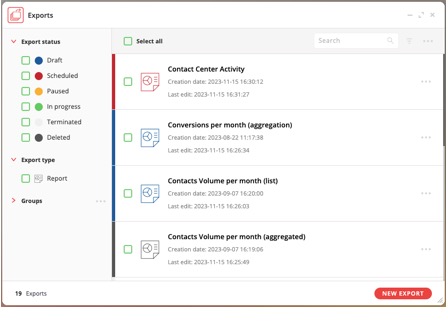
The exports app allows you to:
-
List all performed exports
-
Set a schedule for the export process (one time, every hour, daily, … and custom)
-
Specify the destination for the exported information (email, sftp or CoreMedia notification)
-
Define the information to be exported
-
Name and format (CSV, ODS, XLS and XLSX) of the file that will be exported
-
Type of data (list values or aggregation values)
-
Data source (contacts, IVRs, visitors, campaigns, leads, …)
-
Specific rules to filter information (fields change according to data source choose)
-
Data (columns or metrics)
-
Period (today, yesterday, current week, last week, last 7 days, … and custom)
-
Track what has been exported and what is planned for export
-
Analyze the results of the export
8. CoreMedia Custom App
From an architectural point of view, CoreMedia allows you to quickly add functionality without changing the core of the platform by adding CoreMedia Apps. These apps have access to and can use CoreMedia data, create new visualizations and reports, extend existing segmentation functionality and provide new windows/widgets. The difference between CoreMedia Apps and CoreMedia Custom Apps is only in their ownership, the former being provided by CoreMedia while the latter can be implemented by any partner/customer.
In short, CoreMedia Custom Apps allows the creation of tailor-made applications, specifically designed to meet the unique needs of our customers and perfectly integrated into CoreMedia’s backoffice environment.
9. CoreMedia DataSources
In our quest to provide unparalleled customer engagement, CoreMedia introduces the concept of DataSources. This innovative feature bridges the gap between CoreMedia’s visitor profiles and a client’s internal systems, allowing for dynamic enrichment of visitor data with external information.
A DataSource in CoreMedia is a powerful integration point that connects the visitor profiles on our platform with external data sources from client systems. This connection enables the import and synchronization of relevant data into the CoreMedia environment, offering a more comprehensive view of each visitor.
DataSources operate through two primary mechanisms:
-
Engagement: Clients can import data into CoreMedia contact lists, from which the platform reads and integrates information into visitor profiles. This method is ideal for batch updates and maintaining historical data consistency.
-
XML HTTP: For real-time data synchronization, the XML HTTP DataSource fetches data from external systems via HTTP. This ensures that visitor profiles reflect the most current information from the client’s systems.
Update Mechanisms
DataSources offer two distinct update mechanisms to suit various use cases:
-
Update Value Only When Key Changes: This method updates the visitor profile data only when there is a change in the identifying key, ensuring data consistency over time.
-
Update Value Only When Field is Shown: Optimized for dynamic scenarios, this option updates data only when a specific field is displayed, providing real-time data relevancy.
By integrating DataSources, CoreMedia enables businesses to leverage their internal data assets for enhanced visitor segmentation and more personalized customer engagement strategies, thereby elevating the overall effectiveness of their digital presence.