    <script>
        var bysideWebcare_webcare_id = "A82B12DB68";
        var bysideWebcare_lang = "en";
    </script>
<script src="//www.clientdomain.com/assets/external/byside_webcare.js" type="text/javascript"></script>Tag and Cookies
Last updated 10 minutes ago
Overview of the Tag and Cookie behavior and functionality.
Table of Contents
- Introduction
- 2. CoreMedia Tag
- 3. CoreMedia Cookies
- 4. CoreMedia Service
- 4.2 CoreMedia Campaigns and Tag Management
- 5. CoreMedia and third-party cookies management
- A. FAQ
- A.1. CoreMedia’s script is delaying page load
- A.2. CoreMedia’s script must be loaded at the end of the page in order to minimize the delay
- A.3. CoreMedia’s TAG must be in every page
- A.4. CoreMedia’s TAG must be in the homepage
- A.5. CoreMedia’s contents take long to load
- A.6. CoreMedia’s script must be taken off the homepage because of performance issues
- A.7. Our website’s dynamic contents may delay the loading of CoreMedia’s contents
- B. Attachments
Version: 1.4
Introduction
This document aims to provide an overview of the CoreMedia Tag and its behavior, as well as CoreMedia cookies. It also covers their classification, alignment with ePrivacy policies, and compliance with GDPR regulations. Before diving into the details, let’s clarify some associated terms.
1.1. What is a TAG?
A tag, also referred to as a "pixel," is a snippet of HTML/JavaScript code inserted into a web page’s content. It serves to collect information about the visitor’s session or mark specific events at a certain moment. When the web page loads, the embedded JavaScript code within the tag is executed, enabling the intended functionality or tracking to occur.
Tags can be positioned in different sections of the HTML code (e.g., header, body, footer) based on the tag’s requirements. By gathering data, tags facilitate precise visitor analysis and support crucial marketing initiatives aimed at customer retention and conversion.
1.2. What is a cookie?
A cookie is a group of data stored in text format on the visitor’s computer, defined with an expiration date and the domain, or group of pages to which the cookie applies. The data defined in the cookie provides a variety of functionalities, including maintaining session persistence on the site, saving visitor preferences, or preserving information about the visitor’s journey (e.g., items in the shopping cart).
Analytics Tags, among other digital marketing implementations, typically create and use cookies to uniquely identify and maintain visitor information.
2. CoreMedia Tag
CoreMedia’s Active TAG is the foundations for all interactions between CoreMedia’s services and the website.
Its primary function is to activate CoreMedia’s services on the page where it is placed. It is responsible for collecting the necessary data to create visitor profiles, gather statistics, and enable the insertion of dynamic content (campaigns) configured in CoreMedia’s back office based on customer-defined rules (segmentations).
To ensure the TAG remains static, all required functionalities, including the function library for various usage scenarios, are integrated into the TAG itself. This approach helps minimize the number of HTTP requests for loading additional modules and takes advantage of browser caching capabilities, prioritizing page loading and enhancing the user experience.
As a general principle, any HTTP requests necessary for loading dynamic content are launched only after the page’s onLoad event, which ensures the basic page elements are loaded first. Additionally, CoreMedia’s content is normally loaded asynchronously, in a non-blocking manner, allowing the loading of content from other sources and the execution of other JavaScript code during this process.
The CoreMedia TAG, similar to analytics tags like Google Analytics (GA), is specifically designed to collect navigation data. While it is commonly categorized as 'performance,' it’s important to recognize that clients may have different perspectives and requirements, with some considering it as 'strictly necessary' or 'technical' based on their specific needs.
CoreMedia’s TAG is common to all CoreMedia’s customers (cannot be customised) and its usage is general for the entire service
General characteristics:
-
Unique, static script;
-
All requests are asynchronous and do not interfere in page load time;
-
It is not affect by "3rd party cookie" filters;
-
Size (compressed): about 28.2kB (in version v20230402a);
-
As it is static, the visitor’s browser will normally "cache" the TAG (it is called only once per visitor).
2.1. Deployment
CoreMedia’s Active TAG must be included in every page of the website in order to insure not only proper campaign execution, but also correct data register (visitor behaviour, statistics and the correct calculation of campaign performance).
Customer identification is done through the inclusion of javascript variables defined before the script call.
To ensure the smooth operation of the customer’s website and eliminate dependencies between services, it is essential that the CoreMedia Tag is hosted and served directly from the customer’s domain or a reliable Content Delivery Network (CDN).
Example if script hosted on client’s domain:
Example if script hosted on CDN:
    <script>
        var bysideWebcare_webcare_id = "A82B12DB68";
        var bysideWebcare_lang = "en";
    </script>
<script src="//cdn.byside.com/bwc_we1.js" type="text/javascript"></script>NOTE:
CoreMedia provides an additional service that allows the hosting of the CoreMedia tag in a CDN (if the customer so wishes).
The script’s version is mentioned on the top of it and generally it indicates the date of when it was first deployed. You will find below an example of the current version (v20230420a):
html /* * CoreMedia Webcare Script * http://www.byside.com * * v20230420a */
The script is static and therefore it remains in the browser’s cache. Its loading is only necessary upon the first access request. The script will be served in compressed format (gzip) and its size will be approximately 28,2KB (in version v20230420a). The suggested expiry time for the browser is 2 days.
CoreMedia recommends placing the TAG within the <HEAD`>` section of the page to ensure maximum data reliability. However, it can be included in any part of the DOM, as long as it is loaded before any CoreMedia functionality is called.
2.1.1. Synchronous or asynchronous TAG Loading
The loading of a tag can be either synchronous or asynchronous, depending on how it is implemented.
In synchronous loading, the tag is loaded and executed in a blocking manner, which means that the web page’s rendering and processing are paused until the tag is fully loaded and executed. This can potentially impact the page load time and user experience, especially if the tag takes a long time to load or if there are multiple synchronous tags.
<script src="//www.clientdomain.com/assets/external/byside_webcare.js" type="text/javascript"></script>In asynchronous loading, the tag is loaded and executed in a non-blocking manner, allowing the web page to continue rendering and processing while the tag loads in the background. This approach improves the overall page load time and user experience since the web page is not delayed by the loading of the tag.
To load the TAG file asynchronously include the async attribute in the script tag.
<script async src="//www.clientdomain.com/assets/external/byside_webcare.js" type="text/javascript"></script>Asynchronous loading may not always be suitable for certain tags or situations where the order of execution is important. In such cases, alternative techniques like deferred loading or dynamically injecting the tag may be used to achieve the desired behavior.
NOTE:
Special recommendation (placeholders and asynchronous loading):
If you opt for asynchronous tag loading and your website contains CoreMedia placeholder elements, it is crucial to ensure that the JavaScript function responsible for managing these placeholders is only executed after the tag has fully loaded and is active.
In asynchronous loading, the CoreMedia tag is loaded and executed in a non-blocking manner, allowing other elements on the page to be processed in parallel. However, if the placeholders rely on data or functionalities provided by our tag, misalignment in the execution order could lead to undesirable behaviors or errors.
2.1.2. Language definition
To allow campaign content adaptation to the page’s language in a multi-language website, it is necessary to explicitly define the language in CoreMedia’s Active TAG.
    <script>
        var bysideWebcare_webcare_id = "A82B12DB68";
        var bysideWebcare_lang = "en";
    </script>
    <script src="//www.clientdomain.com/assets/external/byside_webcare.js" type="text/javascript"></script>
The "bysideWebcare_lang" field can have one of the following values:
-
pt - Portuguese
-
br - Portuguese (Brazil)
-
cs - Czech
-
ct - Catalan
-
de- German
-
dk - Danish
-
en - English
-
es - Spanish
-
eu - Basque
-
fr - French
-
gl - Galician
-
hr - Croatian
-
hu - Hungarian
-
id - Indonesian
-
it - Italian
-
jp - Japanese
-
kr - Korean
-
nl - Dutch
-
pl - Polish
-
ro - Romanian
-
ru - Russian
-
se - Swedish
-
si - Slovenian
-
sr - Serbian
-
ua - Ukrainian
2.1.3. Secure page integration (HTTPS)
As presented in the previous examples, the lack of protocol in the script’s address allows the browser to decide which protocol to use when making a request. For that reason, if the customer is browsing through secure pages, the request will be made using "https". Therefore, this type of integration does not need additional configuration.
When called in secure pages, through https, CoreMedia’s Active TAG guarantees that all presented contents (for instance, contact windows or campaigns) will be presented in a secure way (by https).
NOTE:
CoreMedia recommends its customers to use secure protocols in their daily activity.
2.1.4. Additional parameters
In addition to the parameters that were already presented, CoreMedia’s Active TAG can also use three additional parameters:
-
bysideWebcare_alternate_id: used to do a/b testing on full pages;
-
bysideWebcare_channel: used to define the channel per request.
If it is not set, it is associated with the "default" channel ; -
bysideWebcare_cookie_domain: used to set cookie domain;
-
bysideWebcare_cookie_lifetime: used to set cookie lifetime in number of days (ex: 730 - 2 years);
-
bysideWebcare_cookie_expiration_reset: used to control if CoreMedia tag automatically (re-)sets the expiration time of the cookie on each page load. By default is true. When cookie is being set server-side by the client due to ITP, this variable should be set to false;
-
bysideWebcare_default_timeout: used to define a default timeout in seconds for backup content presentation. "-1" is disabled;
-
bysideWebcare_fid: used to identify visitors through a unique visitor identifier, which can be in plaintext or encrypted format. This is an efficient and secure way to pass relevant visitor information to CoreMedia. If necessary, for security reasons, the identifier can be encrypted. Additionally, the encryption can include further visitor information that is relevant for segmentation or that could be added to the existing data on CoreMedia;
-
bysideWebcare_privacy: used to identify the CoreMedia operation mode.
If parameter is set to 1, service will be in an OptOut mode operation. Therefore, the CoreMedia service will automatically be started with a "Required" (Technical) level cookie. More details on CoreMedia Cookies chapter; -
bysideWebcare_querystring: Used not only to define additional information in CoreMedia’s visitor record but also to enable real-time segmentation based on the information on the page. For example, if the visitor is identified in a particular segment within Google’s dataLayer on that page, real-time segmentation can be performed on a page-by-page basis based on this information. This feature enhances the capability to tailor campaigns and experiences in real-time, based on granular visitor data;
If, in a website’s private area (with login), a certain visitor is identified with the following internal segmentation:
customer_type = "A 2ã" and customer_segment = 3
this information can be passed onto CoreMedia’s service (and used in campaign segmentation) by adding the following:
    <script>
        var bysideWebcare_webcare_id = "A82B12DB68";
        var bysideWebcare_lang = “en";
        var bysideWebcare_querystring =
        “customer_type=A+2%c3%a3&customer_segment=3”;
    </script>
<script src="//www.clientdomain.com/assets/external/byside_webcare.js" type="text/javascript"></script>NOTE:
Every value passed through "bysideWebcare_querystring" should be in url encode format.
Information capture on query string is saved on visitor fields.
-
bysideWebcare_visitor_segments_ls_key: used to indicate an external local storage key with visitors segments (ex."externalLSKey") ;
-
bysideWebcare_use_websockets: used to activate/deactivate websockets. Possible values: true of false;
NOTE:
Due to the service’s characteristics, only one form of visitor identification is needed (public or private). If in two different pages the two methods are used, each page will mark a different visitor.
2.2. Use of CoreMedia TAG in private website areas
In public areas, CoreMedia’s visitor session identification is done by using a session cookie. In fact, as for any other analytics tool, this identification is associated to the visitor’s browser instead of the visitor itself. This means that if the same person uses two different browsers (ex.: home computer and work computer; computer and mobile phone; tablet and computer, and so on), to each browser will correspond a different visitor.
In private areas, post-login, it is possible to identify not only the browser’s session but also to associate this session to a unique visitor identification code. This allows us to be sure that, regardless of the device or browser in use, the visitor is unique.
In secure areas, CoreMedia makes it possible to personalize actions through a unique visitor id code. To do that it is necessary to add the variable "bysideWebcare_fid" to CoreMedia TAG.
2.2.1. Masks and eTokens
In the previous example, the visitor identification is presented in clear text. However, CoreMedia’s visitor identification mechanism can be "masked" or use "tokens" (encrypted codes using a public/private key) and associate authentication plugins with customised behaviours, agreed between CoreMedia and CoreMedia’s customer.
Below is an example of token usage:
    <script>
        var bysideWebcare_webcare_id = "A82B12DB68";
        var bysideWebcare_lang = “en";
        var bysideWebcare_fid =
        "0002\x24NB\x2320140204095837\x23xBTqvFSXIVkyuB3lOT\x2F
        Rla5oFaDClbPg\x2FT84Xbx26sDzTPNhzpap7tKgFo2J6Ki9W9Xiuvz
        \x2FkC0d\r\nuSedn0NMFAKNljkJzeQCrE9gYW\x2BxXfcqTly6V\x2
        FV\x2F1G8s18fUhdyZrdWvriQEIb\x2FIZcfTHkI4Xg\x3D\x3D\r\n
        \x23BeWKnL24orQu37E7BLBqtZXhhtUsZG2EIQ5h9eLjEfjp6x902cl
        EtElzzF0GjpskW\x2Fn6ADNNzTPU\r\n3H9XDnwUNjKzZLaGtOA88Qu
        \x2Br8fr5Ql\x2BcYn59jfTYqMKs8NhZ2rJmusWYqffe1EUodewnMT2
        XzIE\r\nJo5yskpyiGSxwX09rEY\x3D";
    </script>
    <script src="//www.clientdomain.com/assets/external/byside_webcare.js" type="text/javascript"></script>
2.3. Support for Single-Page Applications (SPAs)
The CoreMedia tag is primarily designed to operate on websites that perform a full page load each time a user navigates to a new page. However, many modern websites use technologies such as AJAX, React, Angular, or Vue to create Single-Page Applications (SPAs), where the content is dynamically updated without the need for a full page load. In these situations, an additional method is needed to ensure that the CoreMedia tag can effectively track user interactions.
To address these scenarios, CoreMedia provides a specialized JavaScript function: bysideWebcareTrackSubPage(). This function should be invoked each time a new "page" or view is loaded within your SPA.
<script>bysideWebcareTrackSubPage('[NEW URL]', false);</script>The bysideWebcareTrackSubPage() function accepts two parameters:
-
'[NEW URL]': This string represents the new URL of the "page" or view that the user is navigating to. Replace '[NEW URL]' with the actual URL each time a new "page" is loaded.
-
[RESET_ACTIVE_ELEMENTS]: This boolean determines whether the current active elements in the page should be removed and reload from new active elements for the new URL. The default value is false, but in the context of an SPA, you usually do want to force a complete active elements refresh.
2.4. Use of WebSockets
WebSocket is a technology that allows bidireccional communication through full-duplex channels on a single socket (TCP). It was projected to be executed in browsers and web servers which support HTML5, but can be used by any application or application server.
In CoreMedia’s framework, they are used to improve accuracy in real time counting of the number of visitors viewing a particular page, as well as to allow certain types of direct interaction with those visitors (chat, remote assistance, and so on).
Here are a few considerations about the use of WebSockets:
-
These requests are made asynchronously and do not interfere in page loading time;
-
When browsers fail to support WebSockets, several fallback mechanisms are used;
-
Some of those mechanisms that simulate a socket (for instance: "Polling XHR") make AJAX requests that can be wrongly interpreted by performance tools.
2.4.1. WebSockets and performance/monitoring tools
Performance analysis tools generally do not interpret nor evaluate correctly the calls associated with WebSockets or "Ajax/XHR polling" alternatives. This means that it is possible that they give out information about false delays, that can be interpreted as longer loading times which do not happen in reality.
3. CoreMedia Cookies
Cookies are important in CoreMedia because they enable personalization, ad targeting, measurement and analytics, retargeting, and ad control. They allow marketers to deliver personalized experiences, target ads to specific audiences, measure campaign performance, retarget users, and manage ad frequency. However, cookie usage must comply with privacy regulations and user consent requirements.
According to GDPR, no cookie or similar mechanism can be created on a first visit to a website without explicit consent from the visitor. Thus, the most common cookie acceptance campaigns that do not block browsing are only GDPR compliant if no cookies are created until the visitor accepts the cookie policy.
However, different "cookie levels" are defined that differentiate the levels of tracking and data collection. These levels are often defined based on their impact on user privacy and the level of consent required for their use.
3.1. Cookie Levels
In addition to the global GDPR privacy rules, the following classifications were established in 2012 with the introduction of European e-Privacy directives, which were adapted in Portugal through Law 46/2020 that has been in force since August 30 and can be consulted in "Diário da República", (Article 5):
-
Strictly necessary cookies (or technical cookies)
These cookies enable the proper technical functioning of the website, ensure secure navigation, and allow for preferences to be remembered so that it is not necessary to reconfigure them each time you visit the site. Given these purposes, the collection of these cookies is mandatory. -
Performance cookies
These cookies are used to obtain aggregated data on website usage for statistical purposes in order to continuously analyze and improve our service. For example, analytical cookies are used to know the daily volume of visits to the site or the volume of orders placed. -
Personalization cookies
These cookies allow us to present recommendations and offers suitable to your interests on our website. -
Advertising cookies
These cookies are from external entities (third parties) and allow for the presentation of ads that are relevant according to your interests on their respective sites. They also allow for the limitation of the number of times you see a particular ad. These entities may also use this information for their own purposes. To find out which entities are involved, please refer to the Cookie Policy.
Please be aware that the provided descriptions may vary depending on the specific context and are solely intended for illustrative purposes.
3.2. Service Levels and CoreMedia Cookies
CoreMedia provides the following four levels of cookie classification:
-
DO_NOT_TRACK
-
FUNCTIONAL
-
PERSONALIZATION
-
TARGETING
3.2.1. DO_NOT_TRACK Level
This level is necessary and mandatory to activate the CoreMedia service on the client’s website, without any recording of visitor actions or history.
With each new session, the visitor will be recorded as a new visitor.
Cookies created
| Cookie Name | Value | Expiration |
|---|---|---|
byside_webcare_session_tid |
Randomly generated |
Session |
In this service level:
-
"byside_webcare_session_tid" cookie is created and exists during browser session. This cookie is removed when the visitor closes the browser;
-
A new visitor will be created per session;
-
If "byside_webcare_tuid" cookie exists, it will be deleted.
3.2.2. FUNCTIONAL Level
This level allows to save preferences, social interactions and behaviour analysis for website optimization.
From the moment a cookie is created, the visitor will be the same and this information can be used when configuring the CoreMedia service.
Cookies created
| Cookie Name | Value | Expiration |
|---|---|---|
byside_webcare_session_tuid |
Visitor ID (Randomly generated) |
2 years |
In this service level:
-
if "byside_webcare_tuid" cookie is created on the first page request of a visitor, with an expiration set to 2 years (default);
-
During the lifetime of the cookie, for this device and browser the visitor is always the same;
-
If "byside_webcare_session_tid" cookie exists, it will be removed.
3.2.3. PERSONALIZATION Level
This service level allows offering personalized content and relevant ads.
Cookies created
| Cookie Name | Value | Expiration |
|---|---|---|
byside_webcare_session_tuid |
Visitor ID (Randomly generated) |
2 years |
In this service level:
-
if "byside_webcare_tuid" cookie is created on the first page request of a visitor, with an expiration set to 2 years (default);
-
During the lifetime of the cookie, for this device and browser the visitor is always the same;
-
If "byside_webcare_session_tid" cookie exists, it will be removed.
3.2.4. TARGETING Level
This service level allows for visitor data to be recorded and personalized actions to be created.
Cookies created
| Cookie Name | Value | Expiration |
|---|---|---|
byside_webcare_session_tuid |
Visitor ID (Randomly generated) |
2 years |
In this service level,
-
if "byside_webcare_tuid" cookie is created on the first page request of a visitor, with an expiration set to 2 years (default);
-
During the lifetime of the cookie, for this device and browser the visitor is always the same;
-
If "byside_webcare_session_tid" cookie exists, it will be removed.
3.2.5. Differences between service levels
There is no difference in cookie creation between these 3 levels: FUNCTIONAL, PERSONALIZATION and TARGETING. The transition between these levels keeps the same visitor.
What distinguishes these levels is how the client interprets these levels and creates segmented campaigns and/or tags for each service level.
3.3. Service Levels and CoreMedia Campaigns
CoreMedia campaigns can be made according to the CoreMedia client’s settings. These settings can be framed within the different levels of cookie management defined by the client, allowing campaigns to:
3.3.1. Not use any session data
Service Level: Required.
An example: Chat button or Click2Call always present on the page; or, Chat or Click2Call window (without asking for name or email) presented after 5 seconds on the page;
NOTE:
This type of action requires the visitor to explicitly make a contact request and/or fill out a contact form.
3.3.2. Use session data only
Service Level: Functional, Personalization or Targeting
An example: Chat window or Click2Call (without asking for name or email) displayed after 15 seconds of inactivity on the page.
3.3.3. Use navigation data
Service Level: Functional, Personalization or Targeting.
An example: Campaign presented in a layer after 30 seconds of inactivity on a specific page, and if the visitor has more than 2 visits within 7 days
3.3.4. Personal data collection
Service Level: Functional, Personalization or Targeting
An example: Subscription box for Newsletter.
4. CoreMedia Service
4.1. Operation Mode (Opt-In / Opt-Out)
By default, CoreMedia service operates in "Opt-In" mode. In this mode, a "first-party" cookie ("byside_webcare_tuid") is created on the client’s domain with a visitor identifier that, during the lifetime of the cookie, allows the visitor to be recognized between visits.
If desired, CoreMedia can change this behavior and initiate sessions in "Opt-Out" mode (for example: session start until the client accepts the cookie policy). On each new visit, the visitor will be counted as a new visitor. To start the service in this mode, the CoreMedia tag must be loaded with the parameter "bysideWebcare_privacy = 1".
| Opt Out | Opt In |
|---|---|
"BySide Privacy = 1 |
"BySide Privacy = 0 |
"All campaigns will be presented without segmentation or intelligence" |
"All campaigns will be presented with segmentation or intelligence" |
Example:
    <script>
        var bysideWebcare_webcare_id = "A82B12DB68";
        var bysideWebcare_lang = “en";
        var bysideWebcare_privacy = 1;
    </script>

    <script src="//www.clientdomain.com/assets/external/byside_webcare.js" type="text/javascript"></script>
The method used to set cookies for new visitors ("var bysideWebcare_privacy = 1;") only impacts the creation of the visitor. After this moment, changing the cookie level is only possible through the function mentioned here ("bysideWebcare_setDoNotTrack").
Once the client accepts cookies, the following function must be called to allow the client to move to the respective cookie acceptance level (analytics):
bysideWebcare_setCookieServiceLevel( 'LEVEL', false, function () \{ bysideWebcare_reloadAgentContent(); } )The value [LEVEL] can be one of the following:
-
DO_NOT_TRACK;
-
FUNCTIONAL;
-
PERSONALIZATION;
-
TARGETING.
4.2 CoreMedia Campaigns and Tag Management
4.2.1 Validate visitor type
Onsite campaigns have a configuration available that allows restricting the presentation of elements by visitor type. As shown in the image below, it is possible to present the campaign only to anonymous visitor type, only to identified visitor type, or by default, to all visitors.
As anonymous visitors, we include visitors at the DO_NOT_TRACK level.
Visitors who have a FUNCTIONAL, PERSONALIZATION or TARGETING service level are included in the identified visitor type.
4.2.2. Segmentation Rules
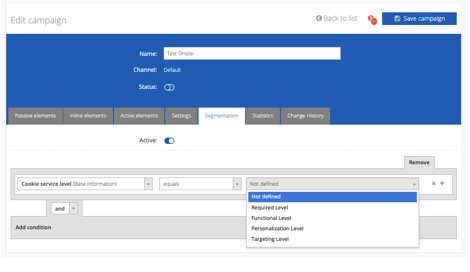
The segmentation rules engine for campaigns includes a "Cookie Service Level" rule that allows you to limit the display of the campaign to visitors who have set the service level indicated in the rule
4.2.3. Setting service level via CoreMedia TAG Manager
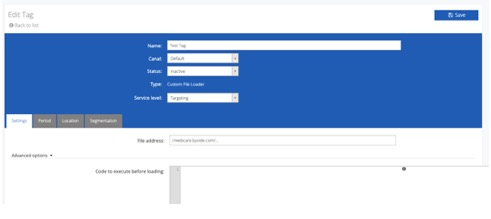
When creating a TAG, it is possible to define the associated service level. The TAG will only be displayed to visitors who have defined the service level.
4.3. Strategy for increasing Opt-In level
The CoreMedia service can, according to the privacy rules defined by each client, be used as a strategy to increase Opt-In levels. Regardless of the initial Opt-In level, the presentation of a Chat or Click2Call service, as an offer of contact/support with the customer, may request personal data (e.g. email and name) and require explicit acceptance of the "terms and conditions".
The content of the "terms and conditions", duly validated with the client’s legal department, should make it clear that by accepting the "terms and conditions", the visitor/customer will automatically be accepting the respective level of Cookies (which may vary according to the CoreMedia client’s privacy policy).
In this case, after acceptance of the "terms and conditions", the CoreMedia service may automatically:
-
Call the CoreMedia function to set the cookie level:
javascript bysideWebcare_setCookieServiceLevel( 'LEVEL', false, function () { bysideWebcare_reloadAgentContent(); } )2. Call CoreMedia client’s cookie management solution to notify the change in cookie level of the visitor (more information in the next chapter).
CoreMedia service can thus be used as a strategy to increase Opt-In levels and manage first-party data of the client itself.
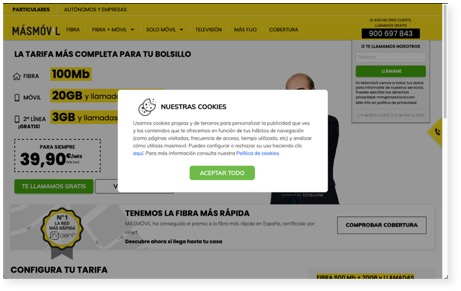
5. CoreMedia and third-party cookies management
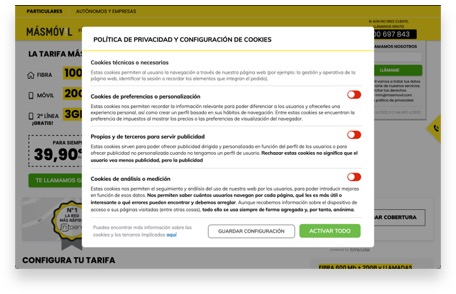
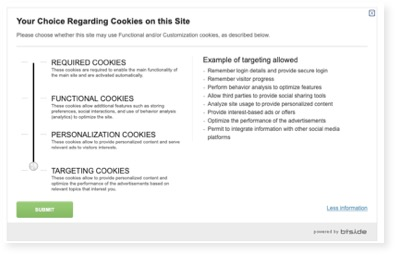
CoreMedia offers services for complete Cookie Management, allowing:
-
Presenting widgets and cookie management campaigns;
-
Managing third-party tags loading according to the Cookie level selected by the visitor.
Examples:
A. FAQ
A.1. CoreMedia’s script is delaying page load
CoreMedia’s script is the result of the experience acquired through several years and was designed in order to minimize the negative impact that any content loading can cause in a website.
As a principle, priority is given to the base contents of the page. The contents managed by CoreMedia wait until these are loaded before starting their own loading process.
From our experience in giving support to service integration to various customers, we have verified that the majority of situations in which a loading delay is identified, it can be easily and efficiently solved by optimising other page elements (for example, multiple calls to Javascript files)
A.2. CoreMedia’s script must be loaded at the end of the page in order to minimize the delay
CoreMedia’s contents only start to be loaded after the base content of the page is loaded. Therefore, including the script at end of the page will not improve loading time.
On the other hand, loading inside the <HEAD`>` allows every CoreMedia functionality to be present in the entire page. In this case, for instance, there is no need to validate whether the script is already loaded before including a placeholder tag.
Loading in the <HEAD`>` has other advantage: the access to the page is registered earlier, therefore minimising the possibility of losing that access register due to a page change before the register takes place.
A.3. CoreMedia’s TAG must be in every page
CoreMedia’s TAG should be present in very page of the website.
Given nature of the service, which has already been described earlier in this document, the function of the TAG is to collect all information needed to create visitor profiles and their statistics and to allow the insertion of dynamic content (campaigns). If the TAG is not present in one of the pages of the visitor journey, visit information is lost, as well as browsing information, and a new visit/session is created.
A.4. CoreMedia’s TAG must be in the homepage
For the same reason that was stated in the previous topic, if the TAG is not in the homepage, all information about visit origin (for instance, the campaigns that originated the visit) is lost.
A.5. CoreMedia’s contents take long to load
CoreMedia’s contents only initiate their loading after the page onLoad event, i.e. after base elements are loaded. This is in order to prioritise the base contents and minimize the impact on loading performance.
Therefore, if there is a delay in base content loading, this can cause an excessive delay on the loading of CoreMedia’s dynamic contents.
To address this type of issues we suggest the identification and solution of the base delay, namely the loading of heavy elements or slow services. In several cases, we have verified that the delays from third party scripts delay were affecting the loading time of CoreMedia’s contents.
A.6. CoreMedia’s script must be taken off the homepage because of performance issues
CoreMedia’s script is optimised to minimize the impact on page loading time.
Taking the script off the homepage will cause the loss of information about how the visitors have arrived on the website (through a search engine, a link in other website, a promotional campaign, and so on) and generates incorrect information - the website’s homepage will be identified as the origin of many visits.
A.7. Our website’s dynamic contents may delay the loading of CoreMedia’s contents
As a general principle, to give priority to page loading and improve visitor experience, all HTTP requests needed for the loading of dynamic contents are only launched after the page’s onLoad event (ie. after the base elements of the page have been loaded). This principle may lead to CoreMedia’s dynamic content being loaded with some delay. When this happens, it is necessary to identify what is causing the delay in the loading of the rest of the elements and consequently delaying the loading of CoreMedia’s contents.
B. Attachments
B.1. CoreMedia TAG functioning in detail
To illustrate the functioning of CoreMedia’s script, we will use as an example the access to a basic website homepage, hosted in the domain "www.byside.com/tag/" containing a static placeholder. We will assume that the webcare_id associated to this website is the following: A82B12DB68.
First of all, we need to distinguish two usage situations:
-
First visitor request (a situation in which we need to create the visitor’s record as well as the cookies and cookie service level management that will allow its identification in future website visits);
-
Further website accesses;
The first situation has a bigger volume of HTTP requests than the second, as the this last one does not require so much information and uses browser cache.
B.1.1. Visitor’s first request
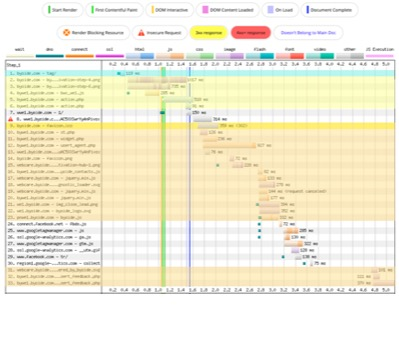
The typical layout of this type of interactions is the one seen in the figure below (generated in http://www.webpagetest.org/):
To make it easier to interpret, we have underlined three different areas:
-
Cyan blue: CoreMedia’s script:
-
Yellow: elements loaded before page onLoad;
-
Orange: elements loaded after page onLoad.
And a reference to special requests:
bwc_we1.js (see 4. on image above)
Refers to CoreMedia’s static script; being a first access, it is not present in the browser’s cache, and has to be loaded.
NOTE:
If this was not the first access, this request would not happen; it would be stored in the browser’s cache.
csl/action.php (see 5 and 6.)
This call will register the initial visitor cookie service level (csl), which can be derived from the existence of the bysideWebcare_privacy configuration variable or using the top level as default.
st.php (see 10.)
This script will register the current page access data in CoreMedia’s platform, namely the page’s URL, the referrer’s URL, browser identification and resolution, access IP, CoreMedia’s script version, and many more.
-
s1.byside.com (see 8. and 13.)
The requests to the s1.byside.com domain are designed to create and maintain a web socket between the page/visitor and CoreMedia’s platform.
Due to lack of generalised support for Websockets from the various browsers, alternative techniques can be used to simulate the usage of sockets (Ajax Polling, JSONP Polling).
The existence of Websockets allows the collection of the current page status (still open or already closed), the register of the time period during which the page was opened (instead of the single fact that it was opened), as well as the establishment of a parallel channel for the asynchronous transfer of content (pull or push) that does not have an impact other browser requests.
NOTE:
For further information please read section "Use of WebSockets"
widget.php (see 11.)
Each static placeholder tag present in the page will cause an access to this script. This will occur only after the base content of page is loaded, and will return the HTML content to be included in that placeholder according to the rules defined in CoreMedia’s backoffice.
That HTML normally causes the loading of the media elements (images, …) associated with that content.
As the script is called by each placeholder, a parallel loading is guaranteed, and the entire loading is optimised.
-
usert_agent.php (see 12.)
This script is called once per accessed page and its function is to return every active campaign configured in the back office to appear on that same page.
As its function is to add content to the page, like the placeholder script, it is loaded only after page onLoad in order to prioritise base website content.
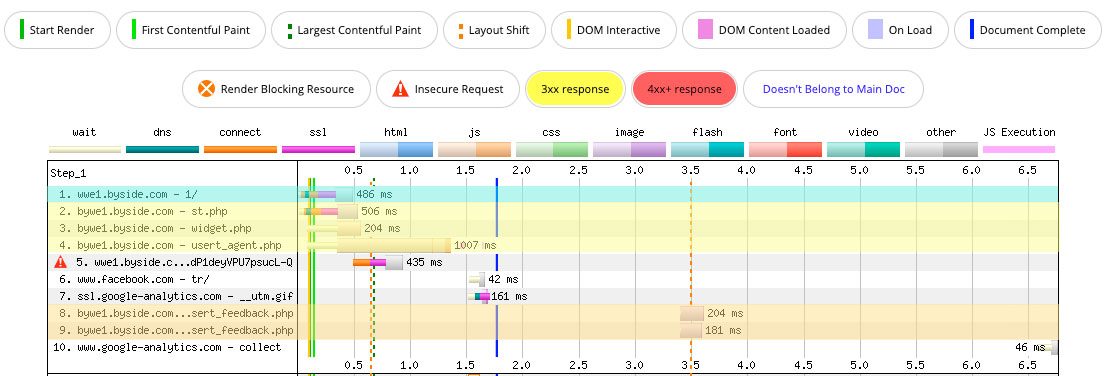
B.1.2. Further website accesses
As previously indicated, every further requests to the website benefit from the existence of a previous visitor identification and, for that reason, some of the requests made to the CoreMedia platform cease to be necessary.
Further accesses may also benefit from browser cache mechanisms, avoiding the loading of CoreMedia’s script and eventually the loading of media contents contained in dynamic content managed in CoreMedia’s platform.
The usual layout for these interactions can be seen in the following picture:
B.2. CoreMedia TAG loading within TAG Managers
CoreMedia’s TAG can be included in third-party Tag Managers that allow the inclusion of customisable HTML content.
The inclusion of CoreMedia’s TAG should be done as previously explained in the section "Deployment". It is compulsory to define the variables "webcare_id" (which identifies CoreMedia’s customer) and "lang" (which identifies page language). As an example, the following code should be included in the HTML field without any encoding.
    <script>
        var bysideWebcare_webcare_id = "A82B12DB68";
        var bysideWebcare_lang = "en";
    </script>
    <script src="//www.clientdomain.com/assets/external/byside_webcare.js" type="text/javascript"></script>
A triggering rule should be created in order for the customised HTML TAG to be included in every page. This allows it to maintain normal active campaign execution, as well as the correct register of visitor behaviour data.
As mentioned earlier, there are certain limitations when loading CoreMedia TAG within Tag Managers. These limitations primarily affect parameter definition, inclusion of passive elements, and delayed requests for HTML content defined in the back office. Here are the potential constraints:
-
Inability to use unique visitor identification in secure areas, because variable definition is done in a static way, the creation of additional parameters such as "bysideWebcare_fid" ceases to be possible.
-
Inability to pass internal values to CoreMedia’s visitor record, for the same reason that is stated on the previous topic, the "bysideWebcare_querystring" variable cannot be utilized to add information to the visitor’s record, limiting the use of such information for segmentation criteria.
-
Content loading delay (for CoreMedia’s contents), generally, it is not possible to define the loading order of the several TAGs contained in the Tag Manager. Therefore, there could be a delay in the loading of CoreMedia’s Active TAG and, consequently, a delay in the loading of CoreMedia’s HTML contents.
-
Language definition, in multi-language websites, it is possible to create different blocks per language by using different values in the "bysideWebcare_lang" variable. This requires rule management in order to include the script with the right language value in the pages that are in that same language. As an alternative, it is possible to define variables before the TAG Manager code is loaded, which allow the creation of different CoreMedia code combinations to obtain the intended result.
NOTE: CoreMedia will give all necessary support in the configuration of its CoreMedia TAG as a TAG Manager. However, assistance for the configuration of third-party TAG Managers (including Google TAG Manager) is the responsibility of each service provider.
-
Inclusion of CoreMedia static placeholders (inside the page), although not impossible, the inclusion of CoreMedia static placeholders (campaign areas inside the page) becomes more complex, as these placeholders need to be included in an undifferentiated way (ie. different placeholder combinations in each page). To do that it is necessary to use javascript variables as indicated in the previous topic. It is possible to load placeholders dynamically by indicating the ID of the existing element in the page where the content must be inserted.
As an example, the following code shows the inclusion of placeholder tags that should be done after CoreMedia TAG.
    <script>
        var bysideWebcare_webcare_id = "A82B12DB68";
        var bysideWebcare_lang = "en";
    </script>

    <script src="//www.clientdomain.com/assets/external/byside_webcare.js" type=“text/javascript"></script>

    <script type=“text/javascript”>
        bysideWebcare_placeholder_loadnow(‘{{placeholder_id}}', '', ‘{{element_id}}’);
    </script>
In the page’s HTML code where the placeholder content should be inserted, there must be an element in the DOM with the identified ID, such as in the following example:
[["{{element_id}}"]]
\{\{The content will be inserted here}}
B.3. CoreMedia and Third-Party Cookies
CoreMedia does not use third-party cookies! This means that the end of third-party cookies will not affect the CoreMedia service! The use of person-level identity and first-party data has always been part of the basic management of CoreMedia Marketing Cloud campaigns. We use first-party cookies, generated on our client’s domain, to identify visitors in channels where we do not have personal identification. For identified clients, we use a personal identifier (CoreMedia FID) that can be shared by first-party cookies or directly in data layers without the need for cookie usage.
The use of different identifiers (cookie ID, email address, customer number, etc.) allows CoreMedia, as a Customer Data Platform (CDP), to create a unified, cross-channel view of the customer that is synchronized with other marketing channels and systems.
This unified customer view allows CoreMedia to associate the personal CoreMedia ID with different internal and external platforms, such as Facebook and Google Marketing Platform, enabling the association of users and customers with different touchpoints, across all channels, online or offline.
B.3.1. CoreMedia FID
The CoreMedia Javascript TAG allows you to add a token to the "bysideWebcare_fid" JavaScript variable. When this variable is defined, CoreMedia does not use any cookies to identify the visitor, and this token becomes the identifier on each page where it is defined.
The bysideWebcare_fid variable should be created before the CoreMedia TAG is loaded.
Example:
    <script>
           var bysideWebcare_fid = "<UNIQUE TOKEN PER VISITOR>"
           var bysideWebcare_webcare_id = "A82B12DB68";
           var bysideWebcare_lang = "en";
    </script>

    <script src="//www.clientdomain.com/assets/external/byside_webcare.js" type="text/javascript"></script>
B.3.2. CoreMedia and ITP (server-side First-Party Cookie)
By default, CoreMedia creates a "first-party" cookie through the browser ("client-side") on the CoreMedia client’s domain. As a result, like all cookies created by browser-based javascript, the CoreMedia cookie is affected by Apple’s ITP 2.3 and expires after 24 hours.
To mitigate the impact of ITP 2.3, the CoreMedia cookie (and all "first-party" cookies) should be created on the web server ("Server-side") on the CoreMedia client’s domain using one of two methods:
-
Creation of the cookie on the server-side;
-
Creation of the cookie using a subdomain.
B.3.3. Cookie ServerSide
In this method, the CoreMedia client should create a cookie on their domain and assign a unique identifier (token) for the visitor in question. This cookie must comply with the following criteria:
-
The name must be "byside_webcare_tuid" (without quotes);
-
The http only flag MUST NOT be enabled, to allow CoreMedia to read the value of the cookie;
-
The expiration of the CoreMedia cookie, defined by the client, must be 24 months;[1][2]
-
In each request made by a visitor who already has the cookie set, the cookie could be set again to continuously extend the expiration period of the cookie. Using bysideWebcare_cookie_expiration_reset variable.
-
This cookie must be created before the CoreMedia tag is loaded on the client’s website.
The purpose of this action is that on one of the first requests of the page to the client’s server, a header is returned with the creation of the cookie.
Example in PHP for cookie creation via Server:
php //set cookie header( 'Set-Cookie: byside_webcare_tuid=' . $cookie . '; ' . 'Expires=Wed, 26 May 2021 17:16:45 GMT; ' . 'Path=/; ' . 'SameSite=None; ' . 'Secure' );
Example in PHP for creating the cookie via Server:
php Set-Cookie: byside_webcare_tuid=abcd1234; Expires=1677429045; Path=/; SameSite=None; Secure );
B.3.4. Subdomain
In this method, as recommended by CoreMedia, a subdomain of the client can be used with the following alternatives:
-
Delegated to CoreMedia: subdomain management carried out by CoreMedia;
-
Managed by the client.
In the Domain Name System (DNS), a subdomain represents a domain that is part of a main domain.
Assuming that the client’s domain is "acme.com" and a subdomain is to be used for management, the subdomain could be something like "activate.acme.com" (note: "activate" can be any desired name. It is recommended to use a short word or even a letter).
B.3.5. Configurations for delegating a subdomain
To delegate a subdomain "activate", of the domain "acme.com", it’s necessary to configure the client’s DNS by adding one of the following:
-
WE1: mkt.acme.com. CNAME bywe1.byside.com -
WE2: mkt.acme.com. CNAME bywe2.byside.com -
SA1: mkt.acme.com. CNAME bysa1.byside.com
NOTE:
Each geographic zone has its own domain. You should consult with your CoreMedia account to determine which zone you are in.
All other settings will be configured by CoreMedia. By delegating the subdomain to CoreMedia, it simplifies the management of the subdomain and offers the following advantages:
-
The management of the subdomain will be guaranteed by CoreMedia;
-
Necessary changes will be made automatically, without the need for client intervention.
After this configuration, CoreMedia should be notified to ensure that necessary settings, testing, and quality control are properly carried out.
B.4. CoreMedia ePrivacy Configuration
In the CoreMedia backoffice, in the "Settings" > "Security" > "Data Privacy" area:
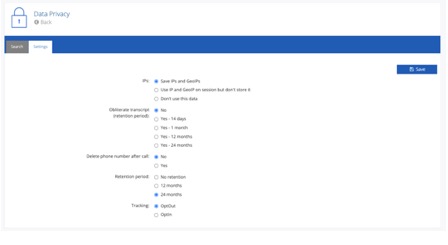
IPs
-
Saving IPs and GeoIP: the visitor’s IP address is persisted, along with geolocation data;
-
Use IPs and GeoIP in session but do not save: the IP address will not be persisted, it will only be used during the session to generate geolocation information (which will be persisted);
-
Do not use this information: the IP address will not be persisted or used to calculate geolocation information;
Transcript
-
No: the chat history (transcript) will not be persisted.
-
Yes: the chat history (transcript) will be persisted.
Clear phone number after the end of the call:
-
No: the phone number will not be persisted.
-
Yes: the phone number will be persisted.
Period of retention
-
No retention: visitor data will not be persisted.
-
12 months: visitor data will not be persisted for 12 months.
-
24 months: visitor data will not be persisted for 24 months.
Tracking
-
Opt-Out: there will be no tracking of visitors.
-
Opt-In: there will be tracking of visitors.
Is this page useful?