Variants, Segmentation and A/B Testing
Learn how to use segmentation and A/B testing to deliver personalized content to your visitors.
Native Personalization allows you to deliver personalized content to different visitor segments and to run A/B tests to compare content variations. Both features are built on the concept of variants.
Why Segmentation and A/B Testing?
Not every visitor has the same needs. Segmentation lets you tailor content to specific audiences — for example, showing a different hero banner to returning customers than to first-time visitors. A/B testing lets you compare one or more variations of the same content against a baseline to find out which one performs better, based on measurable goals such as page views or interaction events.
With Native Personalization you can:
-
Create content variations without duplicating entire pages.
-
Target specific visitor segments with personalized content.
-
Run controlled A/B tests to optimize conversion and engagement.
-
Measure results through the Engagement Cloud.
CoreMedia’s Approach: Variants
Variants are the foundation for both segmentation and A/B testing in CoreMedia. A variant is a copy (clone) of an existing content item — the so-called baseline. The variant is a content item itself, linked back to its baseline through a dedicated property. Variants of variants are not supported; you can only create variants from the baseline content item.
How Variants Fit into the Content Type Model
| Concept | Description |
|---|---|
Baseline |
The original content item. It serves as the default version that visitors see when no variant matches. You always link the baseline to other content items and use it in link lists. |
Variant |
A clone of the baseline. It is a full content item of the same type. You can modify any property of the variant independently of the baseline. A variant needs to be part of an A/B test or have segments assigned to be visible to visitors. |
Link to Baseline |
Every variant holds a reference back to its baseline content item. This link is managed automatically when you create the variant and is not shown in the content form. |
Because variants are regular content items, they integrate naturally with CoreMedia’s content type model — they can be searched, versioned, and managed just like any other content item. However, there are important differences regarding publication and translation workflows; see Publication and Translation for details.
|
Although variants are technically normal content items, you do not use them as link targets or in link lists. Always link to the baseline content item. The system automatically resolves the correct variant to display based on the visitor’s segments and the defined priority. |
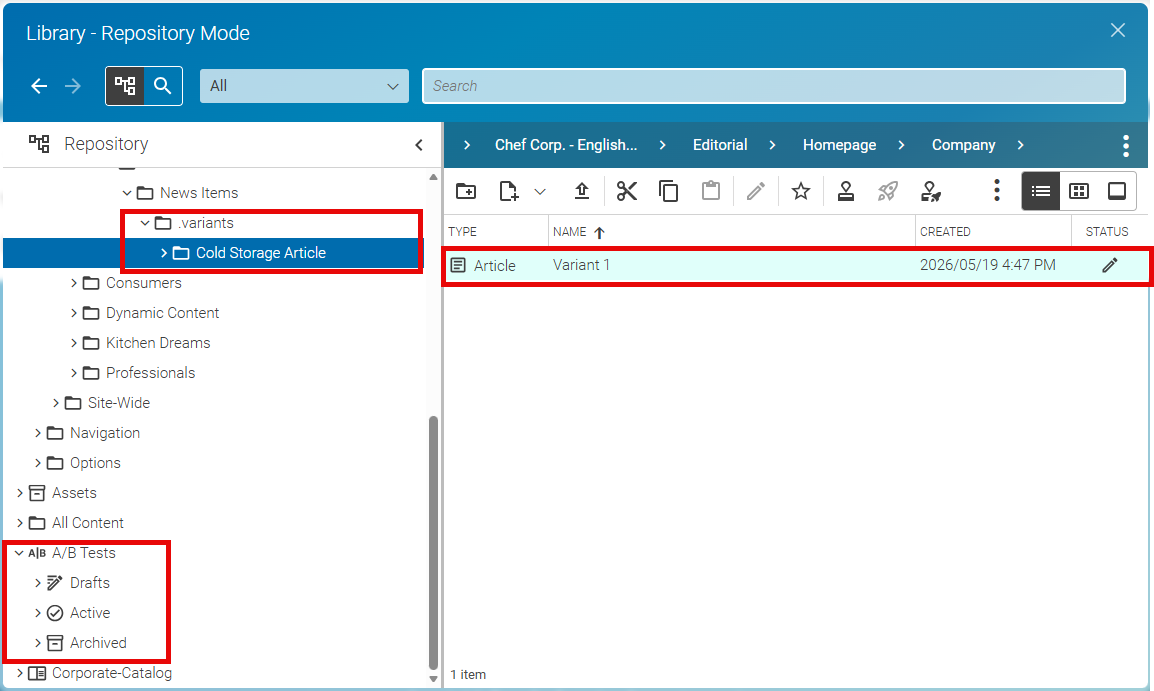
If a variant is not located in the correct folder, you will get an error in the Feedback Hub, which shows the correct folder.

The Library has specific filters for variants and baseline content.

The filter options have the following meaning:
| Filter | Description |
|---|---|
Is Baseline |
Shows all content items that are not variants. |
Is Baseline / Has Outdated Variants |
Shows all baseline content items that have outdated variants. That means, the baseline has been modified since the variant was created or last updated. |
Is Variant |
Shows all content items that are variants |
Is Variant / Segments only |
Shows all content items that are variants and have only segments assigned. |
Is Variant / A/B Test only |
Shows all content items that are variants and are assigned to an A/B tests only. |
Is Variant / Segments and A/B Test |
Shows all content items that are variants and have both segments and A/B test assigned. |
Is Variant / Neither segments nor A/B Test |
Shows all content items that are variants and have neither segments nor A/B test assigned. |
Segmentation with Variants
After creating a variant, you can assign one or more segments to it via the Personalization tab. When a visitor belongs to a segment that is assigned to a variant, they see the variant instead of the baseline.
If a visitor matches multiple segments that map to different variants, the system uses a priority order. You define the priority of variants in the baseline content item, so the system always knows which variant takes precedence.
A/B Testing with Variants
From any variant you can create an A/B test. An A/B test splits traffic between the baseline and one or more variants according to a configurable ratio, measures outcomes against a defined goal, and determines a winner — either manually or automatically.
A/B tests are not persisted as regular content items. They are transient objects but are displayed and managed in Content Studio in the same way as content items. Existing A/B tests appear as a dedicated node in the Library tree view.
Publication and Translation
Variants are not automatically included when you place the baseline content item into a publication or translation workflow. You must add each variant to the workflow explicitly if you want it to be published or translated alongside the baseline.