


Studio Developer Manual / Version 2506.0
Table Of Contents
With the SiteAwareVisibilityPlugin, you can show or hide content form elements
(for example, property fields) depending on the activation of a "feature" for a specific site.
The SiteAwareVisibilityPlugin takes a parameter called feature, which is a name
for the feature. You can group two or more plugins by giving them the same feature name.
The second optional parameter is contentValueExpression, which calculates the value of the site from the current content.
If not set, the values from the global settings will be used instead.
If you configure any Ext JS component to use this plugin, that component only becomes visible when this feature is configured to be active for the site that the current content belongs to.
By default, the configuration for features of a site is done in a CMSettings
content item, which has to be named <SITE_ROOT_FOLDER>/Options/Settings/Studio
Features. Global settings can be configured too in the settings document /Settings/Option/Settings/Studio
Features in case features should not be site-specific.
This settings bundle consists of a StringList property named "features" and contains the
string values that in turn need to be configured as desired in the
SiteAwareVisibilityPlugin:
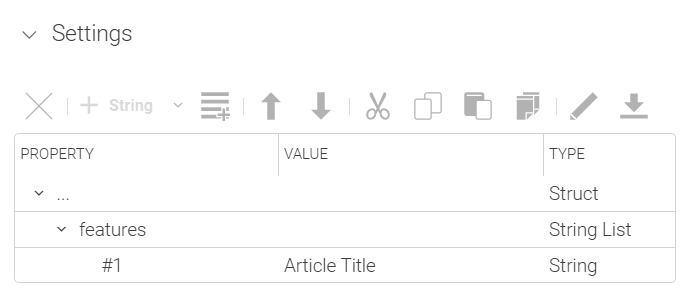
The given example shows how to hide the "Title" field of an article for all sites that do not have the feature "Article Title" activated.
...
Config(DetailsDocumentForm, {
  title: CustomLabels_properties.PropertyGroup_Details_label,
  itemId: "detailsDocumentForm",
  propertyNames: ["title", "detailText"],
  expandOnValues: "title,detailText",
  items: [
	Config(StringPropertyField, {
	  itemId: "title",
	  propertyName: "title",
	  ...ConfigUtils.append({
		plugins: [
		  Config(SiteAwareVisibilityPlugin, {
			feature: "Article Title",
			ifUndefined: false,
			contentValueExpression: config.bindTo,
		  }),
		],
	  }),
	}),
	...
Example 9.38. SiteAwareVisibilityExample.ts
