Lead Management
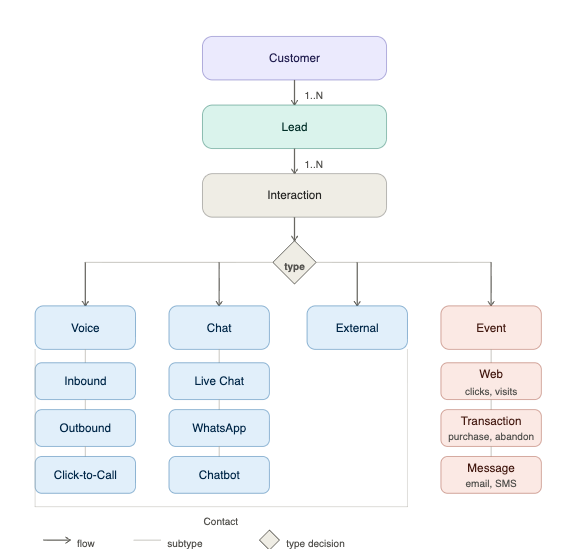
A lead is a potential customer who shows interest in a company's products or services. In Engagement Cloud, every customer interaction across web, voice, chat and chatbots, campaigns and offline channels (via events) can be captured and tracked as a lead.
What you will learn
After reading the Lead Management documentation, you will be able to:
- Understand how lead management works in Engagement Cloud.
- Create and manage lead types to classify and organize potential customers.
- Configure rules to automatically assign lead types to interactions.
- Define custom lead attributes to capture the data that matters to your business.
- Use lead analytics to measure performance and conversions.
- Use the Lead API to enrich and integrate lead data with external systems.
Target audience
The Lead Management documentation is for:
- Business Analysts, Marketing Managers, and Content Managerswho access lead data through Analytics dashboards and exports.
- Managers who configure lead types, rules, and custom attributes.
- Operators and Agents who handle customer interactions.
- Managers and Supervisors who view lead information in ByCard.
- Developers and Integrators who use the Lead API to enrich and manage leads programmatically.
Purpose
Use lead management to centralize, manage, and track business opportunities generated through every type of customer interaction. The main objective is to ensure that every relevant interaction through digital channels, voice, chat, campaigns, and offline touchpoints is recorded and treated consistently as a lead. This approach provides a complete view of the customer journey and helps avoid missed opportunities. You can track the full lifecycle of a lead, from creation to closure, and identify whether it was converted.
How it works
Find Lead Management in Contact Center and Analytics Studio >  > Management > Leads
| Step | Description |
|---|---|
| 1 | Create lead types to classify and manage potential visitors. |
| 2 | Configure rules in the Rules tab to define which lead type applies to each interaction. Rules use conditions based on Channel, Team, Skill Type, and Skill, combined with AND/OR logic. Rules are evaluated top to bottom; the first matching rule defines the Lead Type. |
| 3 | Each time a visitor or customer interacts with a skill or a configured event occurs, Engagement Cloud evaluates the rules and automatically creates or associates a lead |
| 4 | Managers and supervisors can view lead information in the ByCard. After closing the active contact card, contacts are grouped by lead. Each lead shows a color-coded icon with the contact count: green for converted, grey for closed without conversion, and blue for open. |
| 5 | Use the Engagement Cloud API to retrieve and enrich lead data. |
| 6 | View lead data in the Leads listing panel, Contact and Event views, and dashboards in the Contact Center and Analytics Studio. |
Lead creation logic
When a contact occurs, Engagement Cloud evaluates the rules configured in the Lead Management App:
- If a matching rule exists, Engagement Cloud creates a new lead of the matched lead type (if the customer has no open lead), or associates the contact with the customer's existing open lead.
- If the customer has more than one open lead, Engagement Cloud selects the most recent open lead or the lead with the highest score that matches the rule.
- If no rule matches, no lead is associated with the contact.
More about leads
A lead is the starting point of the sales process. It represents a potential customer who has been identified and captured but not yet qualified or converted into a paying customer. A lead is more than just contact information; it also includes context such as behavior, demographics, and intent. In V2.0, leads are anchored to the Customer entity, which serves as the common reference point for all contact types including inbound, outbound, and external. This means that every interaction, regardless of channel, can be captured and treated consistently as a lead. Engagement Cloud opens a lead for a customer when a configured event occurs (such as contacting a skill, clicking a banner, viewing a product, or filling out a form) or when a contact matches a configured rule. After opening a lead, Engagement Cloud keeps the lead open until one of the following occurs:
- The customer makes a conversion. A conversion depends on the type of lead and can be a purchase, a subscription, contract signed, or another configured business event.
- The lead is closed automatically when a configured closure event occurs.
- The lead is closed automatically after a defined period of inactivity. You can define this period in the lead type settings. Each customer can have multiple leads, allowing for a comprehensive view of their interactions and potential opportunities. Leads also store specific information such as origin, provider, external campaign ID, and custom attributes. In CoreMedia Digital Experience Platform, a lead contains contact information such as phone number, email address, and name of the contact, as well as the type of browser and device used, the creation and closing dates, RGUs, and the sale value.
Related links
View Lead Analytics2 articles
view lead analytics
Lead Management Reference2 articles
Screens, and forms reference with detailed information about all the fields of Leads App.