


Figure 2.5, “Simplified site structure” shows an example of a simple site where each box stands
for a content item and arrows mean that a content item links to another item. The text in the
boxes contains the name of the property which connects it to the other content item. For
simplicity, only a few content types are shown, content is used very sparingly and the linked
contents of the (Sub) Page are omitted. They are similar to that of the
Page, except for the Site Indicator.
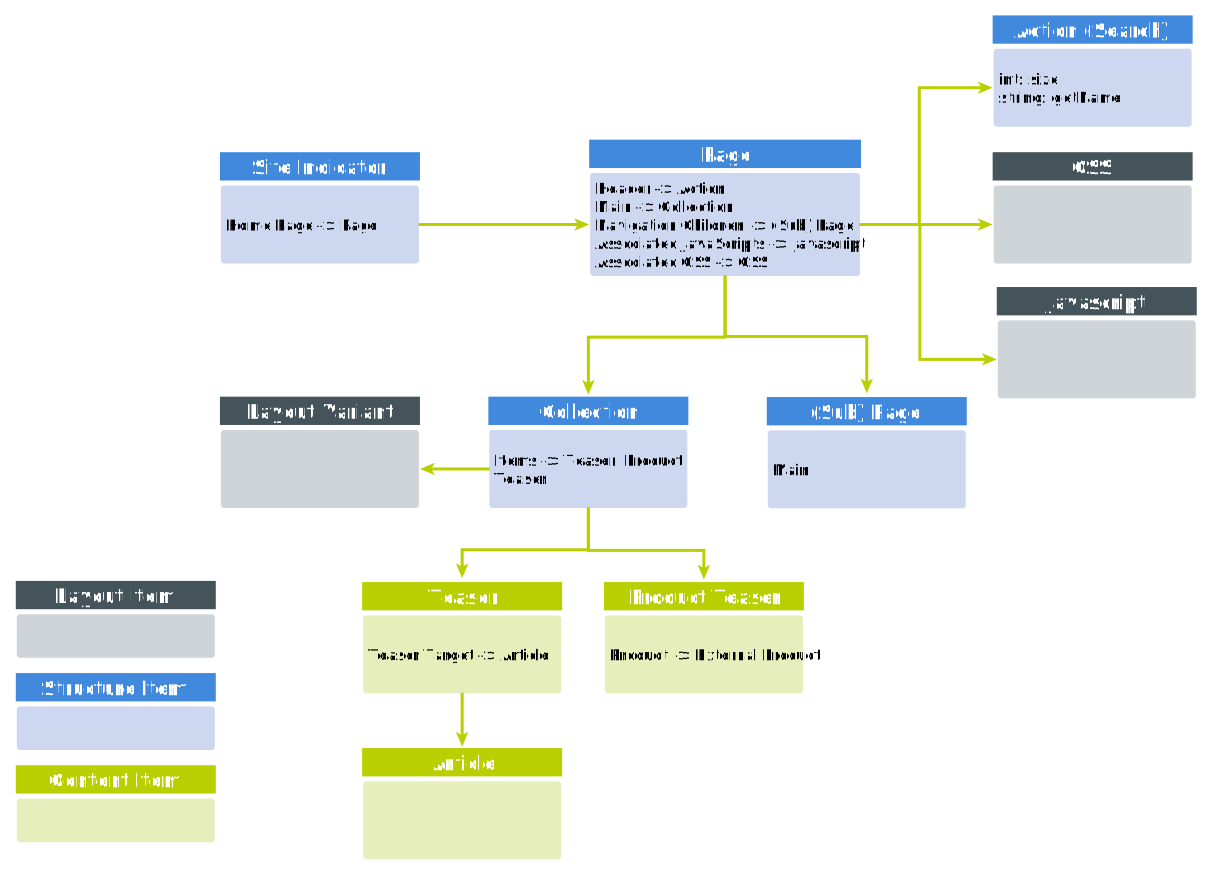
So, the Page content is linked by the Site Indicator making it the main page of
the site. The page links to a Javascript and CSS content which
allows you, or a designer, to customize the layout of the page without the help of your IT department.
The page also links to an Action which adds a search field to the header of the
page. To create a simple hierarchy, the page links to a sub page which normally appears as a
subpage in the navigation of the main page (see Figure 2.6, “Navigation Children and navigation on page”) To add real
content, the page references a Collection from a placement.
The Collection groups content together. It links to a Layout Variant
which determines the layout of the collection, a slide show or a carousel for example.
Finally, the Collection contains several links to Teaser and
Product Teaser types which contain some real content but may also link to an
Article or in case of the Product Teaser to a target
in the e-Commerce system.
There are many more content types involved to create a comprehensive website. See Section 9.1, “Content Types” for an overview.
 |  |  |
 |