Solution Overview for Business Users / Version 2506.0
Table Of ContentsRequirements
A common pattern for CoreMedia projects is to reuse content and display the same content item on various pages in different layouts and view variants. A content list, for example, could be rendered as simple bulletin list or as a list of teasers with thumbnails. Similarly, an article can be displayed in a default ("full") view or as a teaser.
Usually the rendering layer decides what view should be applied to a content item in different
use cases. For example, the view rendering results of a search on the website could use the
asListItem view to render the found items.
Editors still need a varying degree of control to influence the visual appearance of content in specific cases. They might want to decide whether a list of content items should be displayed as a teaser list or a collapsible accordion on a page, for example.
Solution
A dedicated content type called CMViewtype is available that can be associated with
all CMLinkable content types.
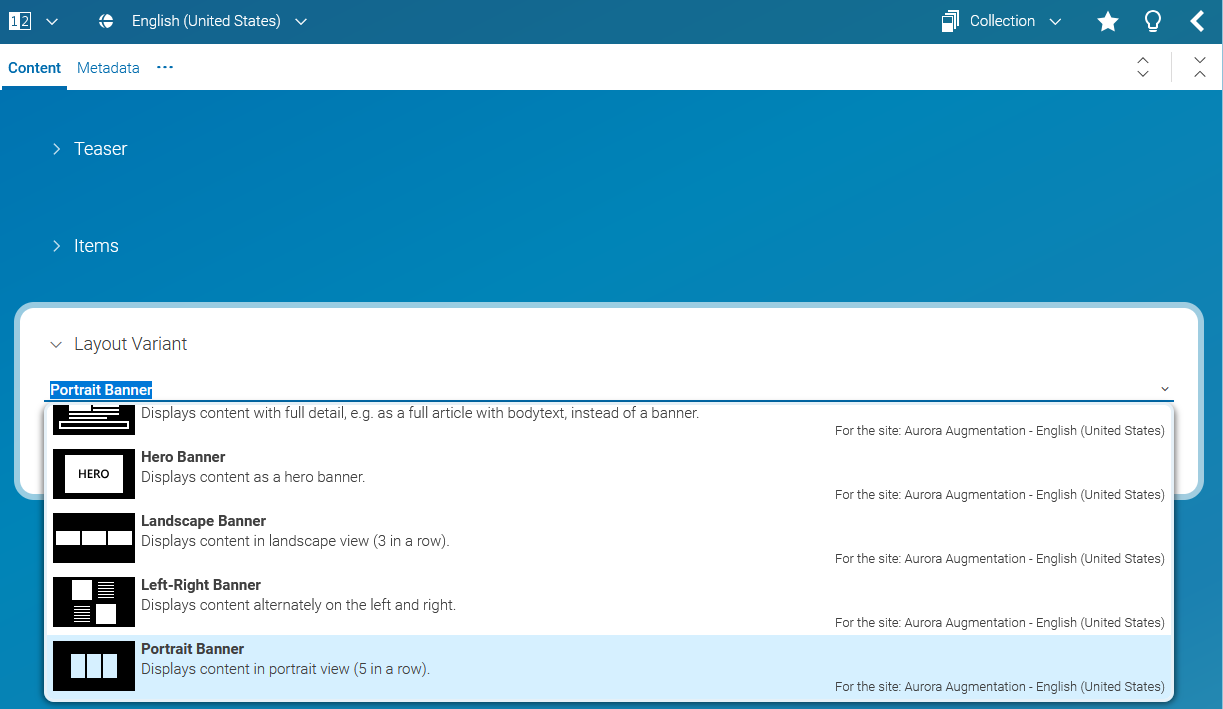
Selecting a view type in CoreMedia Studio
You can use the view type selector which is associated with the view type property to select a specific view type for a content item, a collection for instance. The view type selector is implemented as a combo box providing an icon preview and a description text about the view type. View types can be defined globally or site specific. If the view type item is configured for a site, the name of the site is also displayed in the combo box item.