Solution Overview for Business Users / Version 2506.0
Table Of ContentsDepending on the configuration of the adapter, the appearance of the tree may vary. The following sections take care of all configuration places and options.
Basic Adapter Configuration
This section is covering the two possibilities to enable the content-hub-adapter-dropbox integration. Please note that those options are valid for all content-hub-adapters. Before configuring the adapter, please refer to the documentation Content hub configuration for preliminary steps.
Global Adapter Configuration
To enable the content-hub-adapter-dropbox for all sites, create a CMSettings content item inside the
/Settings/Options/Settings/Content Hub/Connections/ folder.
For convenience reasons, it is recommended to name this content item "Dropbox".
Site Specific Adapter Configuration
To enable the content-hub-adapter-dropbox for a single site, create a CMSettings content item inside the
Options/Settings/Content Hub/Connections/ folder, relative to the site's root folder.
For convenience reasons, it is recommended to name this content item "Dropbox".
Detailed Adapter Configuration
Basic Structure
The table below shows the initial toplevel entry for all content-hub-connector configurations.
After creation of the initial struct list called connections the next step is to create the first entry. This can be done in Studio with the struct editor by pressing "add Item to ListProperty". The table below shows the entries which are common for all connectors.
| Key | Type | Value | Required |
|---|---|---|---|
| connectionId | String | <SOME_UNIQUE_ID> | Yes |
| factoryId | String | <YOUR_FACTORY_ID> | Yes |
| enabled | Boolean | true or false | Yes |
| settings | Struct | Yes |
Table 17.2. Entries for all connectors
Required Configuration
In section Basic Structure above and according to the table, the settings struct is currently empty. The settings struct itself holds specific configuration options for the connector (common to all connectors). The table below shows all potential entries.
| Key | Type | Value | Required |
|---|---|---|---|
| accessToken | String | Access token to open a connection to Dropbox | Yes |
| displayName | String | Name of the root folder to display in Studio | No |
Table 17.3. Entries in settings struct
Example
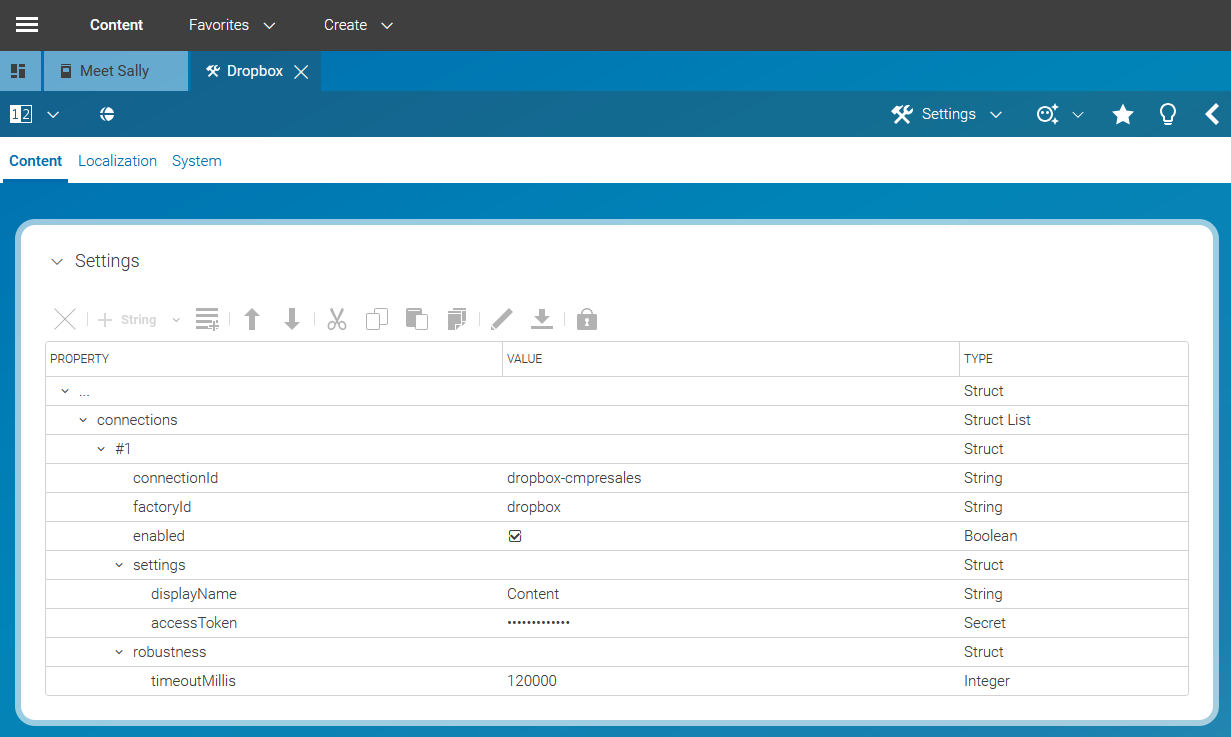
The image below depicts a full configuration of the content-hub-adapter-dropbox in global space.