


Solution Overview for Business Users / Version 2506.0
Table Of ContentsA content item in CoreMedia Studio can only be edited by one user at the same time. In order to work with a content item, the content is first “checked out”. Once checked out, a content item is not available to other users for writing. Each time a content item is checked out, a new, separate version of the content item is created, and the old version is stored for safekeeping. This makes it possible to track changes in the content. Since a new content item version can be created using any previous older version of this content, it is also possible to restore old content.
Before a version of a content item can be published, it must be checked in again and then approved by a user with the appropriate authority to do so. The approval process can be configured: one way is to allow the creator of the content item to approve the it directly. Another method is to let another person — such as the editor-in-chief — take responsibility for content approval (“second pair of eyes” principle). Resources are normally approved and published as part of a workflow process, although it is possible to configure immediate approval and publication.
Links between content item in CoreMedia are generated using unique IDs, meaning that content items can be renamed or moved about, without the link becoming invalidated. However, should a content item queued for publication contains links to content items that have not been published, then its publication would permit “dead” links into the content delivery environment. To prevent this, the CoreMedia Publisher automatically checks to see if publication processes would create such dead links. If the check proves positive, users can automatically include the missing content items to have a sound set not creating dead links.
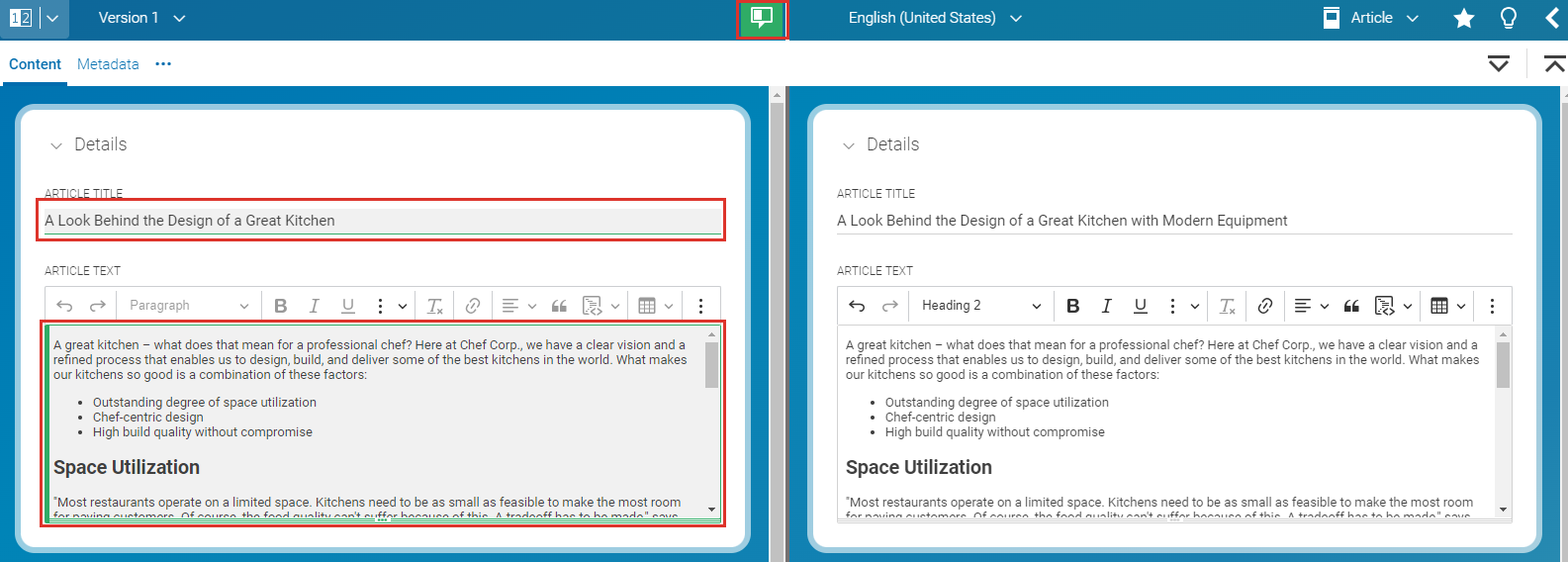
In CoreMedia, you can compare your current working version of a content item with older versions. This includes highlighting of differences. This is shown in the following figure.
Older versions can be easily restored within CoreMedia Studio.
