


Solution Overview for Business Users / Version 2506.0
Table Of ContentsSalesforce Marketing Cloud (SFMC) is a customer relationship management (CRM) tool by Salesforce. CoreMedia Content Cloud offers you an integration with the following features:
The Integration with Salesforce Marketing Cloud enables editorial user to push content from the CoreMedia CMS to Salesforce Marketing Cloud and for example reuse it for campaigns or Newsletters.
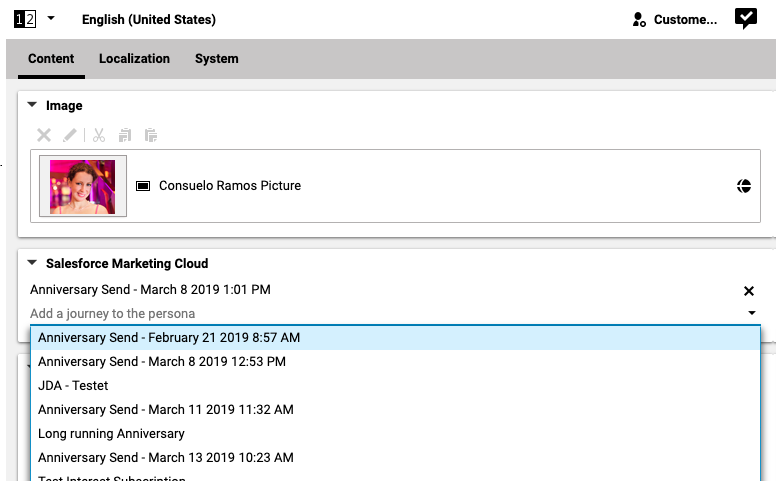
There are also new CoreMedia Personalization rules that leverage SFMC journeys and enables you target CMS content based on the SFMC journey a website visitor is part of.
Additionally, we provide an API to pass data to SFMC Data Extensions for e.g. storing form data or manage subscriptions.
Uploading Content to Salesforce Marketing Cloud
CoreMedia Blueprint allows you to upload content to Salesforce Marketing Cloud (SFMC). For configured string, richtext or image blob properties of a given content type CoreMedia Studio has an upload button on the Action toolbar.

For each uploaded CoreMedia content there is a folder with a name composed of the document name and content ID. In the folder for each uploaded content property there are one or more assets. For an image blob property there is an asset for each of the transformed image crops and the original image. The name of an asset is composed of the content name, property name and - in case of images - the crop name. The uploaded assets can now be used in SFMC, for example as content in a newsletter.
SFMC Journey Integration
The condition checks whether the current user is associated to a certain SFMC journey. For the configuration of the feature read the section 'Upload Content to Salesforce Marketing Cloud' of the blueprint developer manual.
In the second input field you select a comparison operator from the drop-down box. You can choose if the user "is" or "is not" associated to the journey that you select in the third input field.

API to pass data to SFMC Data Extensions
CoreMedia Content Cloud provides a Service API to push data into SFMC data extensions.
